Delta-island.com
  • Home
  • Delta Store
  • Contents
    • Net Yaroze
    • Safety Guide
  • Tutorials
    • Playstation : Delta PSNee QSB
    • PlayStation : Delta Smartwave
    • PlayStation : IGR - In Game Reset QSB
    • STU Net Yaroze
    • Megadrive : Mega SmartDrive
    • PS1 To NeoGeo Controller
    • Repair Everdrive MD V2
    • Repair Everdrive MD V3
    • GDEMU Power Supply Mod
    • Repair GamePark32 GP32 BLU FLU
    • Sega Dreamcast - DreamTray
  • Download
  • Forum

Select your language

  • Français (France)
  • English (United Kingdom)
Tutorial • Sega Mega Drive / Genesis • Switchless • Delta Mega SmartDrive

Delta Mega SmartDrive – Complete Installation Guide

This tutorial is designed to guide you step by step through the installation of the Delta Mega SmartDrive on your Sega Mega Drive / Genesis. This solution transforms your console into a multi-region, allows PAL / USA / JAP, 50Hz / 60Hz, OSD, as well as convenient control via the controller ou le Reset button.

🌍 PAL / USA / JAP ⚡ 50Hz / 60Hz 🖥️ Built-in OSD 🎮 Controller control 💡 Optional bi-color LED
🛒 Available in the Delta Store: Delta Mega SmartDrive
Le Mega SmartDrive is a superior replacement for traditional switchless mods, offering a more modern, cleaner, and more elegant solution, with visual feedback, last mode memory, and seamless integration.
→ View Mega SmartDrive in the Store
Key takeaways
✅
Difficulty
MD1: intermediate. MD2: advanced, micro-soldering.
⚡
Safety
The console must be powered off before any work is carried out.
🧬
Key step
Accurately identify the motherboard revision before installation.
Useful links
• Delta safety guidelines
• Delta Store
Delta Mega SmartDrive
🎮 How does the Mega SmartDrive work?
🕹️ Via la controller
Hold A + B + C + START for 3 seconds to change the region.
Red = PAL • Blue = USA • Purple = JAP
🔁 Using the RESET button
Hold RESET ~3 secondes to access quick region selection.
⚡ In-Game Reset
In game: ↓ + A + B + C + START
Instant console reboot.
💡 Visual indicator
A colored on-screen bar indicates the active region at startup.

🚀 Mega SmartDrive – Modernize your Mega Drive

Discover the Mega SmartDrive, the ultimate accessory to transform your Sega Mega Drive / Genesis into a smart and modern system while preserving its authenticity.

Thanks to its advanced features and optimized installation, the Mega SmartDrive redefines the gaming experience by offering flexibility, compatibility, and ease of use.

 
🌍 Smart Region-Free
Easily switch between PAL / USA / JAP et 50Hz / 60Hz via la controller ou le bouton RESET.

Your console becomes fully region-free, with no external switches or complex modifications.
🖥️ Built-in OSD
A built-in On-Screen Display lets you view and select modes directly on screen.

A modern solution that simplifies use and adds real everyday convenience.
💡 Bi-color LED (optional)
Ajoutez une LED bi-color for instant visual feedback:
Red = PAL • Blue = USA • Purple = JAP

An aesthetic and practical option for modding enthusiasts.
⚡ Dynamic frequency management
The Mega SmartDrive automatically adjusts the frequency according to the region:
  • PAL : 53.203424 MHz
  • NTSC : 53.693175 MHz
No need to change the crystal oscillator: everything is automated for perfect compatibility.
📺 Optimized video compatibility
In composite video, the picture stays in color regardless of the selected region.

For optimal quality, using an RGB SCART cable is strongly recommended.
🎮 In-Game Reset (IGR)
Instantly reboot your console using the controller.

Ideal for users of EverDrive ou les sessions intensives.
🧩 Simplified installation
Optimized PCB with smart solder points.

Fast, clean, and reliable installation, even for intermediate users.
 
Key advantage: unlike MFO, DFO or equivalent solutions, the Mega SmartDrive offers a more modern, more flexible solution that is perfectly suited to modern displays and advanced setups.
 
Why choose Mega SmartDrive?
The Mega SmartDrive is designed for enthusiasts who want to get the most out of their Mega Drive.

✔ Discreet installation
✔ Intuitive interface
✔ Maximum compatibility
✔ Modernized experience

Join the era of retro intelligence with Mega SmartDrive — where authenticity meets innovation.
 
🔒 Important safety instructions
⚠️ Work must only be performed with the power disconnected
• Completely unplug the console and its power supply.
• Work on a clean, stable, and well-lit surface.
• Use a suitable soldering iron, flux, and a fine tip.
• Always inspect your traces and solder joints with magnification before reassembly.
👉 View the safety rules
 

✨ Why Delta Mega SmartDrive?

Full multi-region management
  • PAL / USA / JAP selection
  • 50Hz / 60Hz frequencies
  • Console made region-free
Ease of use
  • Changement via controller 1
  • Selection possible via Reset
  • On-screen OSD + last mode memory
Premium finish
  • Optional bi-color LED
  • Instant visual feedback
  • Cleaner approach than a classic switchless mod
Video note: in composite video, the picture remains in color regardless of the selected region. For the best result, RGB / RGB SCART output is recommended.
 

🧰 Required tools

  • Delta Mega SmartDrive
  • Screwdriver suitable for your console
  • Fine-tip soldering iron
  • Electronics solder
  • Flux strongly recommended
  • Scalpel precision
  • Magnifier / microscope recommended
  • For MD2: thin Kynar 30AWG wire

🌍 Supported revisions

Mega Drive / Genesis 1 :
Support for all motherboard revisions :
VA0, VA1, VA3, VA4, VA5, VA6 et VA7
✔ Compatibility with all regions : PAL / USA / JAP

Special case: la MD1 VA7 requires the "Delta SmartDrive MD2"

Mega Drive / Genesis 2 :
Support for all motherboard revisions :
VA0, VA1, VA2, VA3 et VA4
✔ Compatibility with all regions : PAL / USA / JAP
 

🔧 1 - Disassembling the console

⚠️ WARNING – electrical safety
Disconnect the power supply unit and all console connections. The goal is simply to access the motherboard: there is no need to disassemble the power supply.
🎥 Disassembly videos
• Sega Mega Drive 1 / Genesis 1 : https://www.youtube.com/watch?v=NKVGbYO-EH0
• Sega Mega Drive 2 / Genesis 2 : https://www.youtube.com/watch?v=ezzVop4uz5U

🧭 2 - Identifying your Sega Mega Drive / Genesis motherboard

Before any installation, it is essential to accurately identify your motherboard revision. Each version requires a specific installation diagram.

Tip: compare your motherboard with the photos below to determine your exact model (VA + PCB reference).
 

🎮 Mega Drive / Genesis 1 (MD1)

VA0 - 837-6656 (JAP)
VA1 - 837-6832 (JAP)
VA2 - 837-6992 (USA)
VA3 - 837-7071 (USA)
VA4 (PAL / JAP)
VA5 / VA6 (PAL / USA / JAP)
VA6.8
VA7
Important : the revision MD1 VA7 requires the use of the Delta SmartDrive MD2.
 

🎮 Mega Drive / Genesis 2 (MD2)

VA0 (JAP / PAL / USA)
VA1 (ASIA / PAL / USA)
VA1.8
VA2 / VA2.3
VA3
VA4
 

🧩 3 - Complete installation diagrams by motherboard

If your motherboard revision does not appear in the list, please contact us via le forum Delta. We can then provide you with the specific installation diagram and add it to the tutorial.

Sega Mega Drive 1 - IC BD MD 5 JPN - VA0 - 837-6656
Dedicated installation diagram
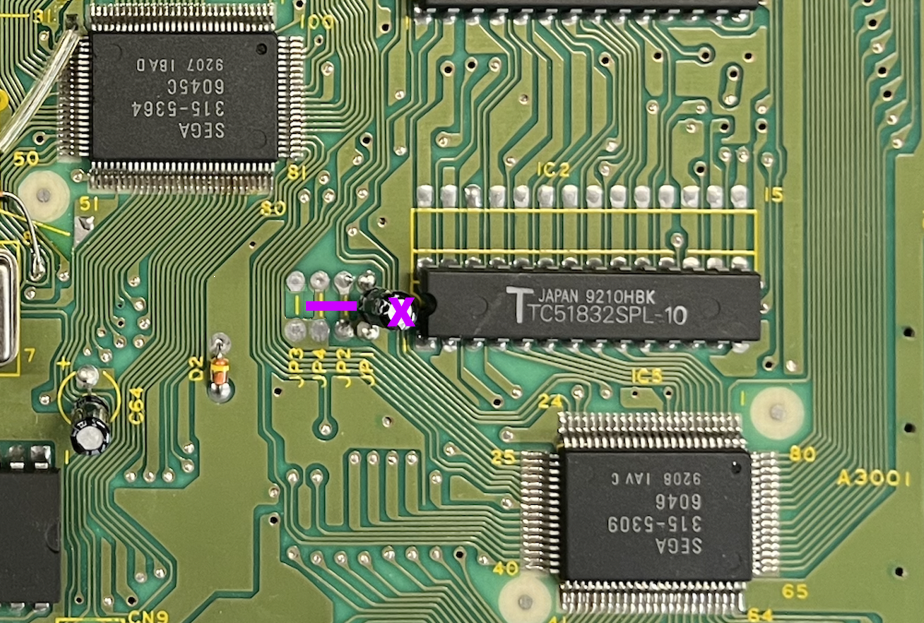
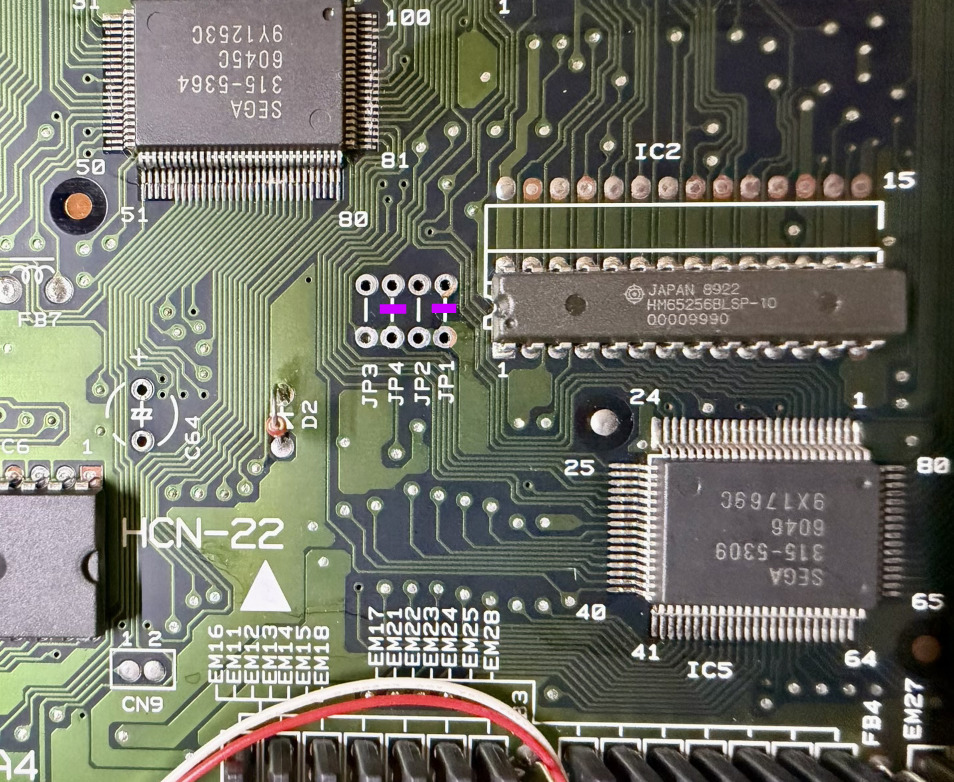
• Cut the 3 traces marked in purple.
• Then position the Delta SmartDrive and make the solder joints according to the installation diagrams below.
Sega Mega Drive 1 - IC BD MD 5 JPN - VA0 - 837-6656 - visual 1
Sega Mega Drive 1 - IC BD MD 5 JPN - VA0 - 837-6656 - visual 2
Sega Mega Drive 1 - IC BD MD 5 JPN - VA0 - 837-6656 - visual 3
Sega Mega Drive 1 - IC BD MD 5 JPN - VA0 - 837-6656 - visual 4
Sega Mega Drive 1 - IC BD MD 5 JPN - VA0 - 837-6656 - visual 5
Sega Mega Drive 1 - IC BD MD 5 JPN - VA0 - 837-6656 - visual 6
Sega Mega Drive 1 - IC BD MD 5 JPN - VA0 - 837-6656 - visual 7
Sega Mega Drive 1 - IC BD MD 5 USA - VA2 - 837-6992
Dedicated installation diagram
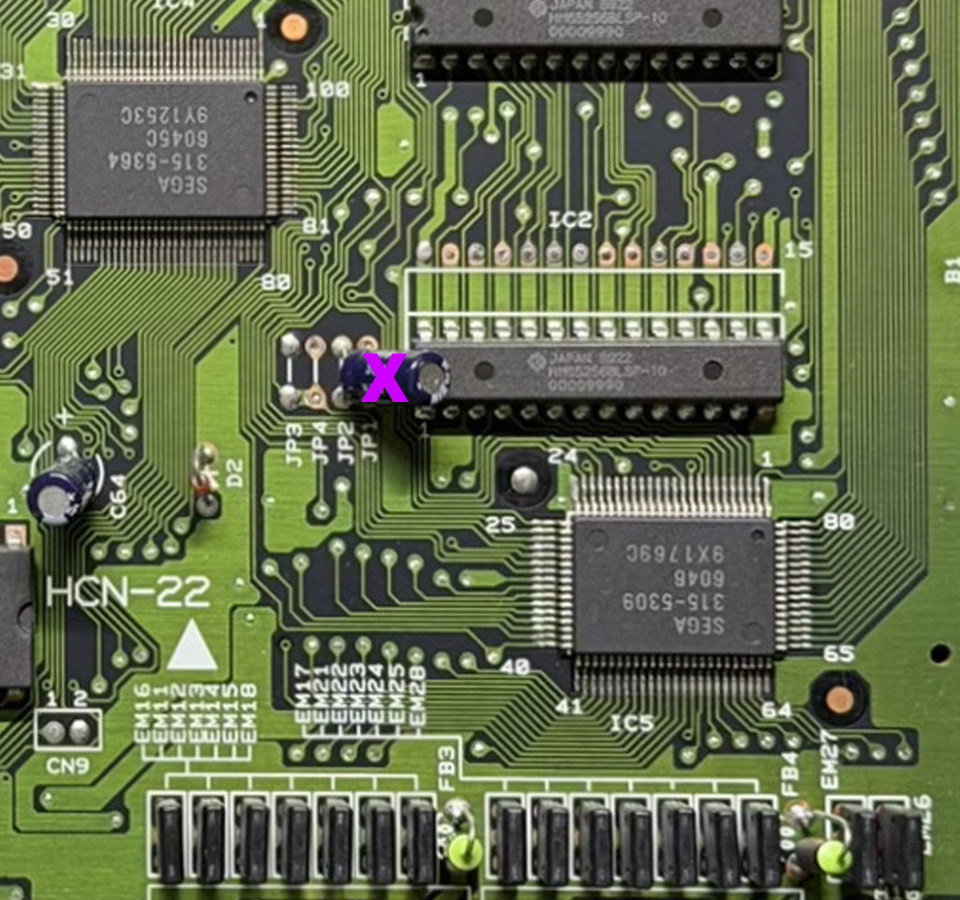
• Cut the 3 traces marked in purple.
• If a capacitor is present on JP1 / JP2 / JP3 / JP4, remove it cleanly.
• Then position the Delta SmartDrive and make the solder joints according to the installation diagrams below.
Sega Mega Drive 1 - IC BD MD 5 USA - VA2 - 837-6992 - visual 1
Sega Mega Drive 1 - IC BD MD 5 USA - VA2 - 837-6992 - visual 2
Sega Mega Drive 1 - IC BD MD 5 USA - VA2 - 837-6992 - visual 3
Sega Mega Drive 1 - IC BD MD 5 USA - VA2 - 837-6992 - visual 4
Sega Mega Drive 1 - IC BD MD 5 USA - VA2 - 837-6992 - visual 5
Sega Mega Drive 1 - IC BD MD 5 USA - VA2 - 837-6992 - visual 6
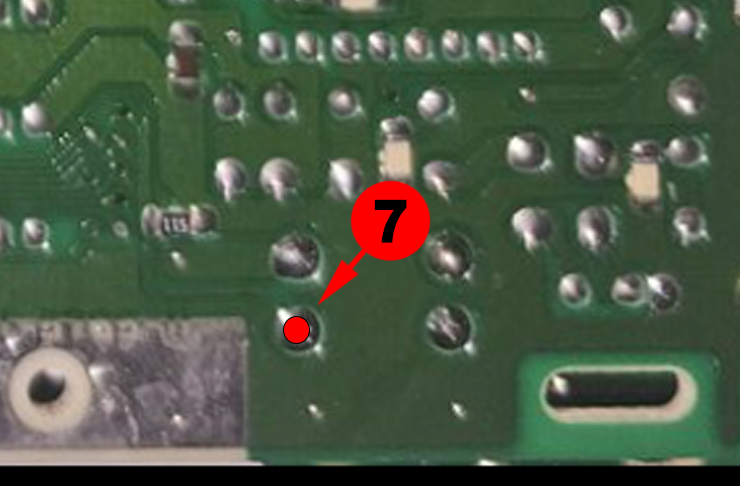
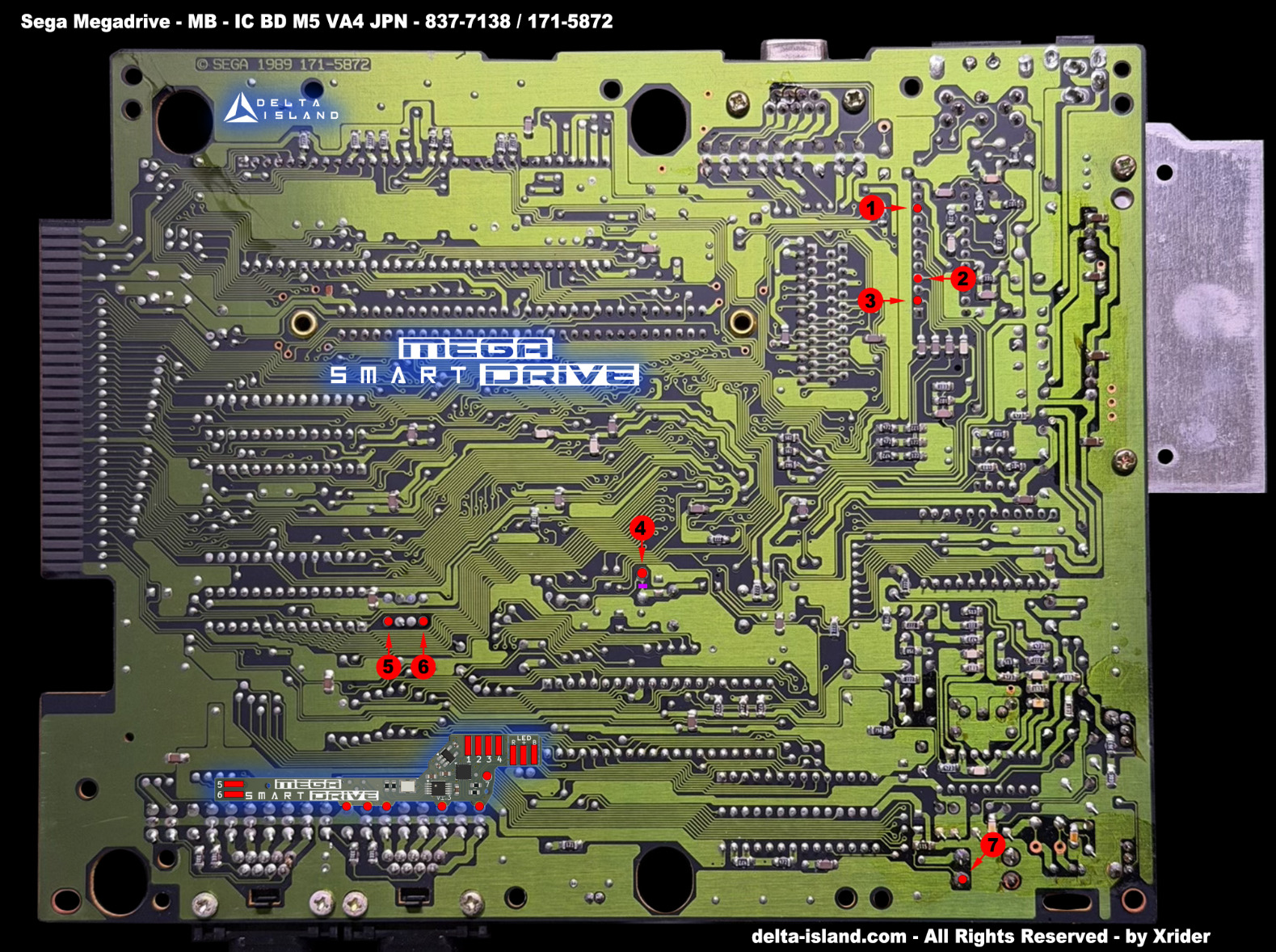
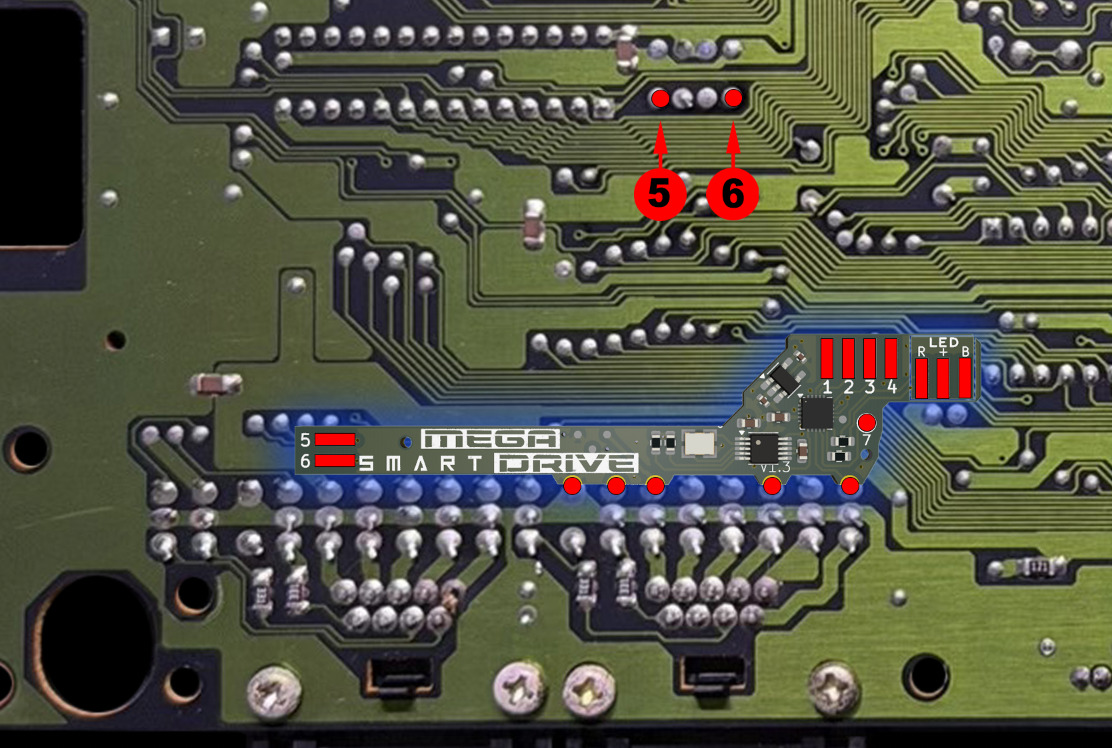
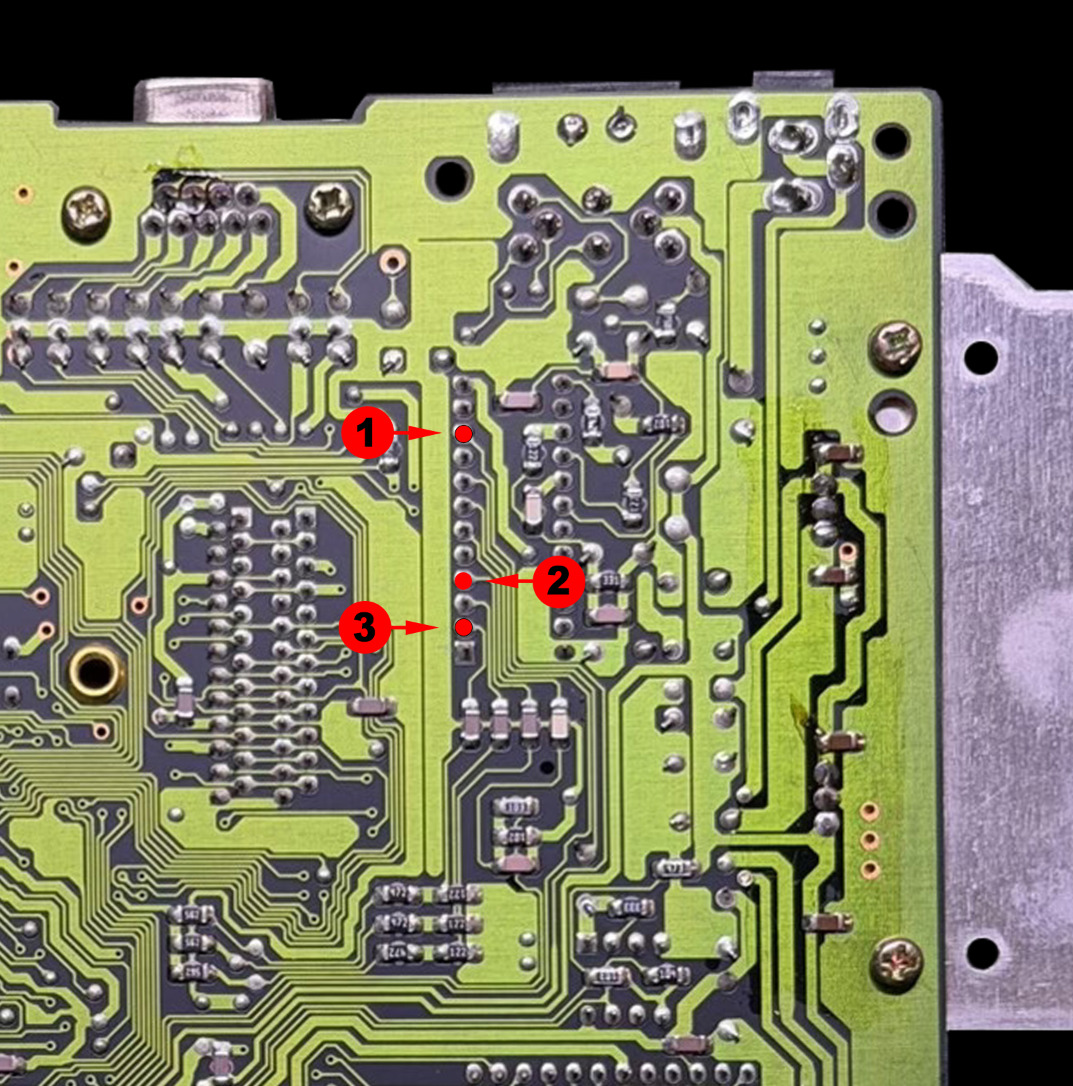
Sega Mega Drive 1 - IC BD MD 5 JPN - VA4 - 171-5972-20 / 837-7138
Dedicated installation diagram
• Cut the 3 traces marked in purple.
• If a capacitor is present on JP1 / JP2 / JP3 / JP4, remove it cleanly.
• Then position the Delta SmartDrive and make the solder joints according to the installation diagrams below.
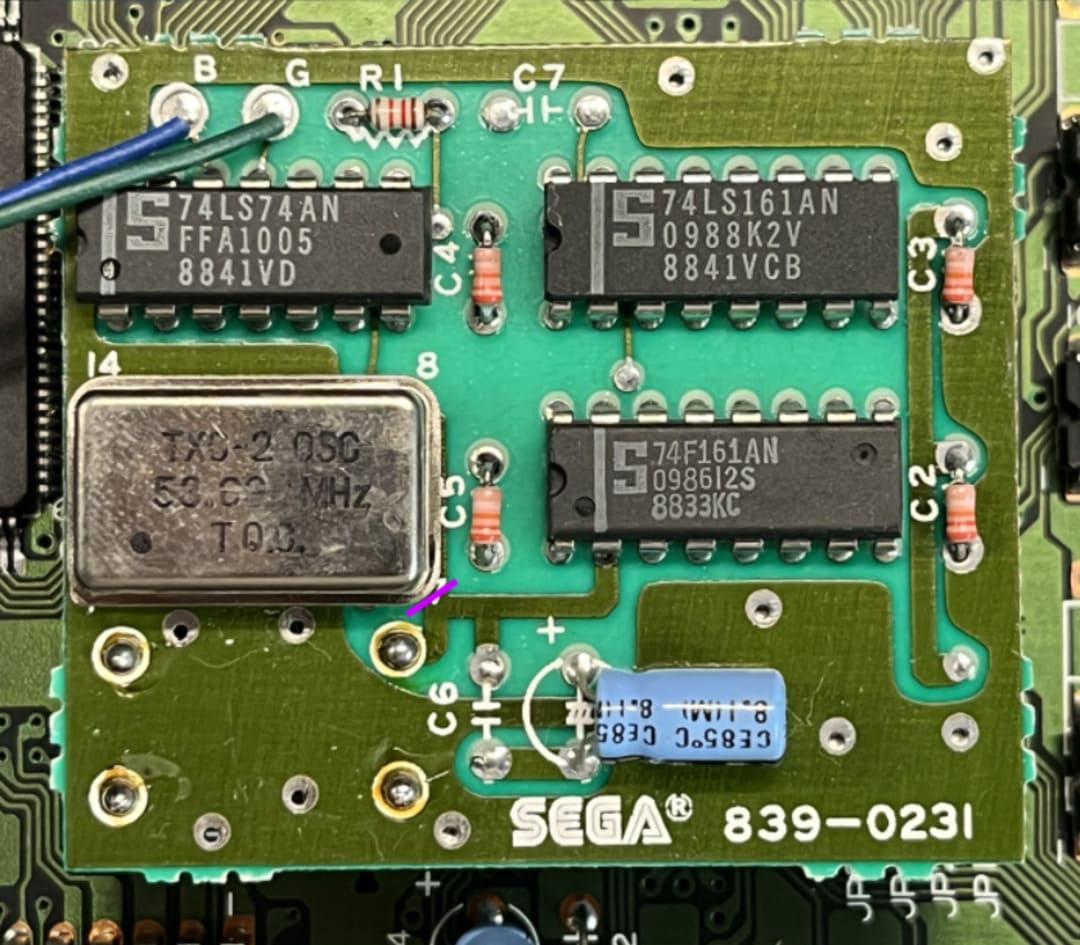
Sega Mega Drive 1 - IC BD MD 5 JPN - VA4 - 171-5972-20 / 837-7138 - visual 1
Sega Mega Drive 1 - IC BD MD 5 JPN - VA4 - 171-5972-20 / 837-7138 - visual 2
Sega Mega Drive 1 - IC BD MD 5 JPN - VA4 - 171-5972-20 / 837-7138 - visual 3
Sega Mega Drive 1 - IC BD MD 5 JPN - VA4 - 171-5972-20 / 837-7138 - visual 4
Sega Mega Drive 1 - IC BD MD 5 JPN - VA4 - 171-5972-20 / 837-7138 - visual 5
Sega Mega Drive 1 - IC BD MD 5 JPN - VA4 - 171-5972-20 / 837-7138 - visual 6
Sega Mega Drive 1 - IC BD MD 5 JPN - VA4 - 171-5972-20 / 837-7138 - visual 7
Sega Mega Drive 1 - IC BD MD 5 PAL - VA4 - 171-5972-20
Dedicated installation diagram
• Cut the 3 traces marked in purple.
• If a capacitor is present on JP1 / JP2 / JP3 / JP4, remove it cleanly.
• Then position the Delta SmartDrive and make the solder joints according to the installation diagrams below.
Sega Mega Drive 1 - IC BD MD 5 PAL - VA4 - 171-5972-20 - visual 1
Sega Mega Drive 1 - IC BD MD 5 PAL - VA4 - 171-5972-20 - visual 2
Sega Mega Drive 1 - IC BD MD 5 PAL - VA4 - 171-5972-20 - visual 3
Sega Mega Drive 1 - IC BD MD 5 PAL - VA4 - 171-5972-20 - visual 4
Sega Mega Drive 1 - IC BD MD 5 PAL - VA4 - 171-5972-20 - visual 5
Sega Mega Drive 1 - IC BD MD 5 PAL - VA4 - 171-5972-20 - visual 6
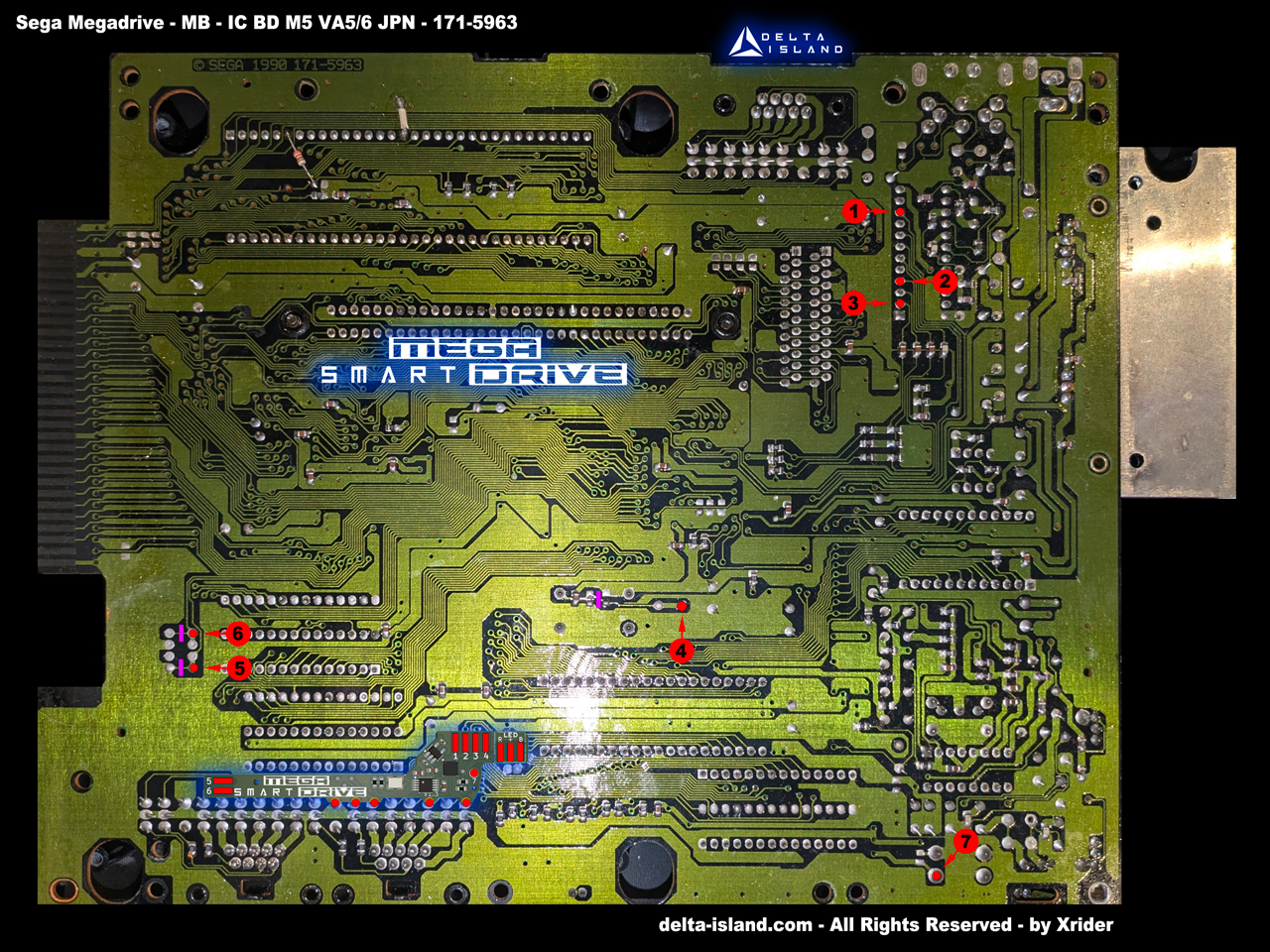
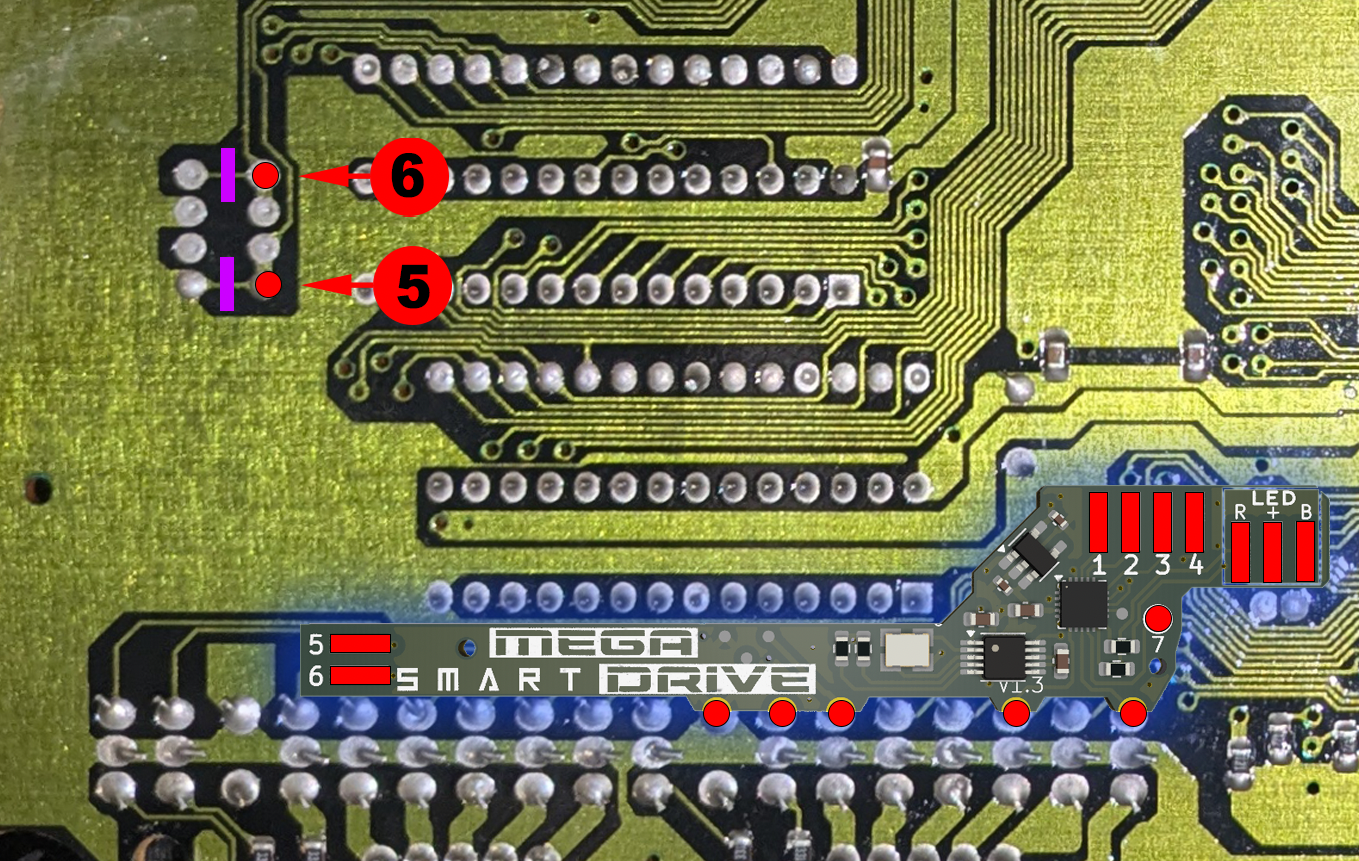
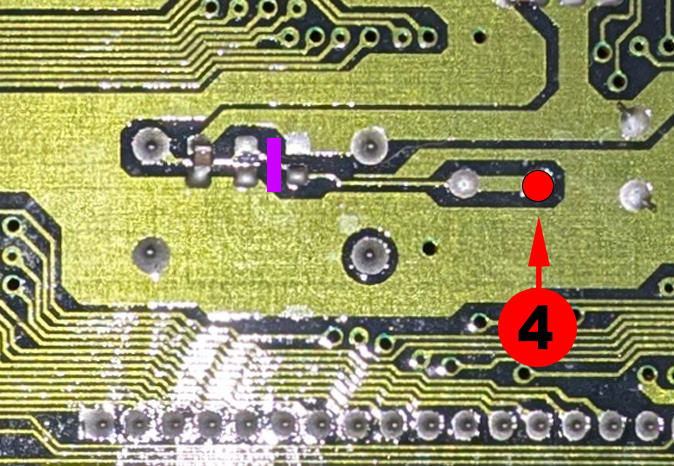
Sega Mega Drive 1 - IC BD MD 5 JPN - VA5 & VA6 - 171-5963
Dedicated installation diagram
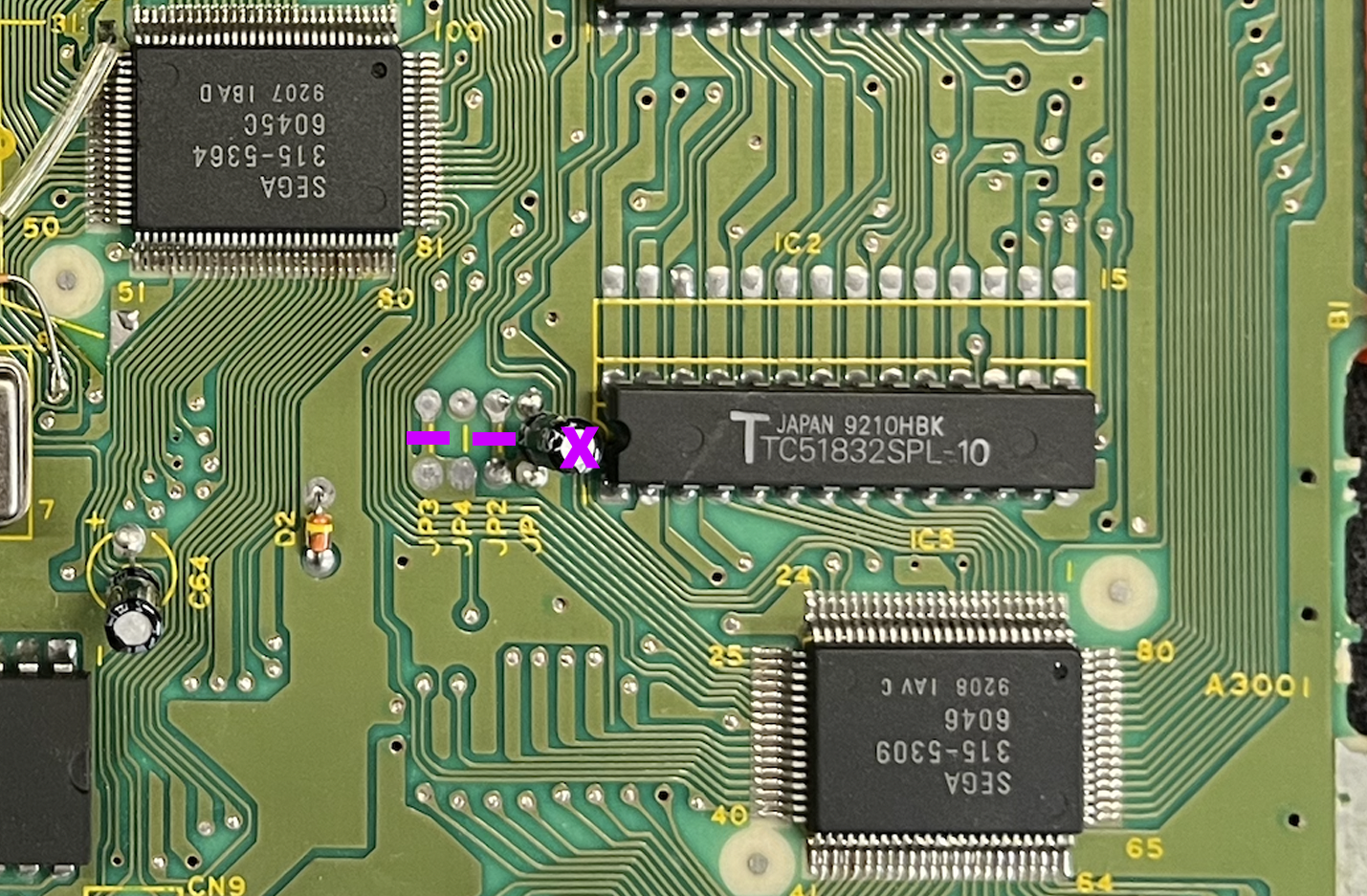
• Cut the 3 traces marked in purple.
• If a capacitor is present on JP1 / JP2 / JP3 / JP4, remove it cleanly.
• Then position the Delta SmartDrive and make the solder joints according to the installation diagrams below.
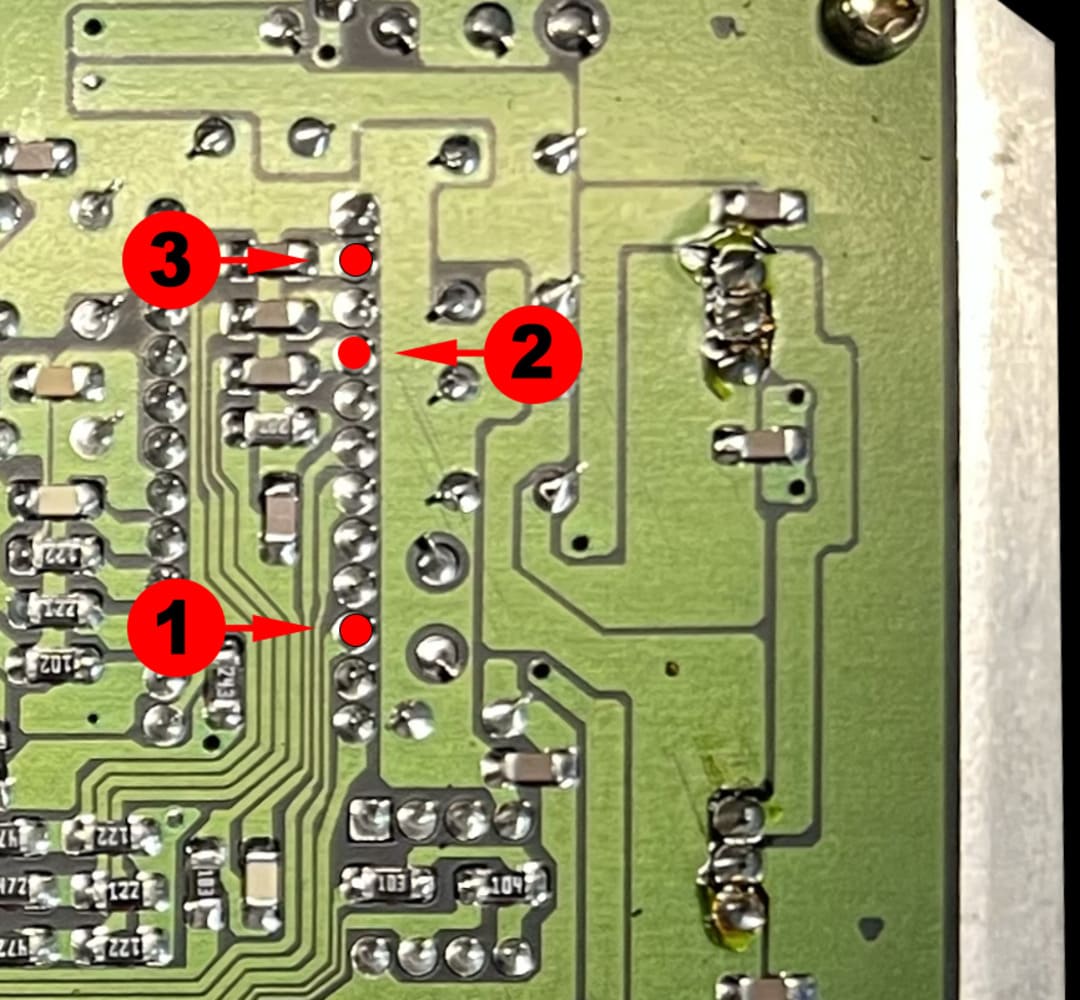
Sega Mega Drive 1 - IC BD MD 5 JPN - VA5 & VA6 - 171-5963 - visual 1
Sega Mega Drive 1 - IC BD MD 5 JPN - VA5 & VA6 - 171-5963 - visual 2
Sega Mega Drive 1 - IC BD MD 5 JPN - VA5 & VA6 - 171-5963 - visual 3
Sega Mega Drive 1 - IC BD MD 5 JPN - VA5 & VA6 - 171-5963 - visual 4
Sega Mega Drive 1 - IC BD MD 5 JPN - VA5 & VA6 - 171-5963 - visual 5
Sega Mega Drive 1 - IC BD MD 5 PAL - VA5 & VA6 - 171-5963-21
Dedicated installation diagram
• Cut the 3 traces marked in purple.
• If a capacitor is present on JP1 / JP2 / JP3 / JP4, remove it cleanly.
• Then position the Delta SmartDrive and make the solder joints according to the installation diagrams below.
Sega Mega Drive 1 - IC BD MD 5 PAL - VA5 & VA6 - 171-5963-21 - visual 1
Sega Mega Drive 1 - IC BD MD 5 PAL - VA5 & VA6 - 171-5963-21 - visual 2
Sega Mega Drive 1 - IC BD MD 5 PAL - VA5 & VA6 - 171-5963-21 - visual 3
Sega Mega Drive 1 - IC BD MD 5 PAL - VA5 & VA6 - 171-5963-21 - visual 4
Sega Mega Drive 1 - IC BD MD 5 PAL - VA5 & VA6 - 171-5963-21 - visual 5
Sega Mega Drive 1 - IC BD MD 5 PAL - VA5 & VA6 - 171-5963-21 - visual 6
Sega Mega Drive 1 - IC BD MD 5 PAL - VA5 & VA6 - 171-5963-21 - visual 7
Sega Mega Drive 1 - IC BD MD 5 PAL - VA5 & VA6 - 171-5963-30
Dedicated installation diagram
• Cut the 3 traces marked in purple.
• If a capacitor is present on JP1 / JP2 / JP3 / JP4, remove it cleanly.
• Then position the Delta SmartDrive and make the solder joints according to the installation diagrams below.
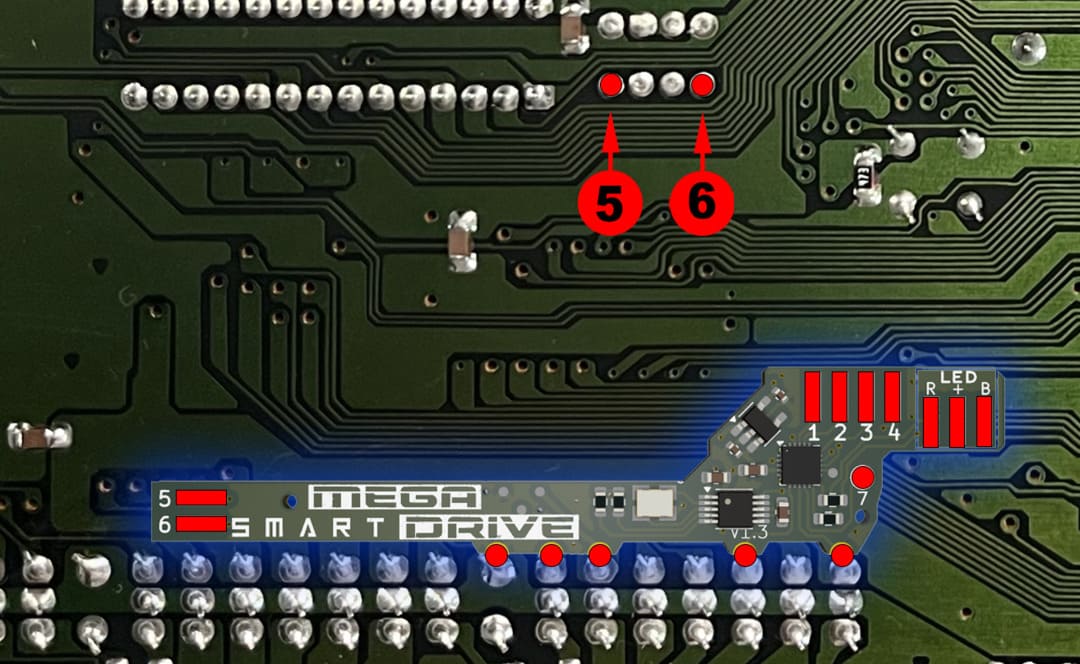
Sega Mega Drive 1 - IC BD MD 5 PAL - VA5 & VA6 - 171-5963-30 - visual 1
Sega Mega Drive 1 - IC BD MD 5 PAL - VA5 & VA6 - 171-5963-30 - visual 2
Sega Mega Drive 1 - IC BD MD 5 PAL - VA5 & VA6 - 171-5963-30 - visual 3
Sega Mega Drive 1 - IC BD MD 5 PAL - VA5 & VA6 - 171-5963-30 - visual 4
Sega Mega Drive 1 - IC BD MD 5 PAL - VA5 & VA6 - 171-5963-30 - visual 5
Sega Mega Drive 1 - IC BD MD 5 PAL - VA5 & VA6 - 171-5963-30 - visual 6
Sega Mega Drive 1 - IC BD MD 5 PAL - VA5 & VA6 - 171-5963-30 - visual 7
Sega Mega Drive 1 - IC BD MD 5 JAP - VA7 - 171-6217
Dedicated installation diagram
• Cut the 3 traces marked in purple.
• Then position the Delta SmartDrive and make the solder joints according to the installation diagrams below.
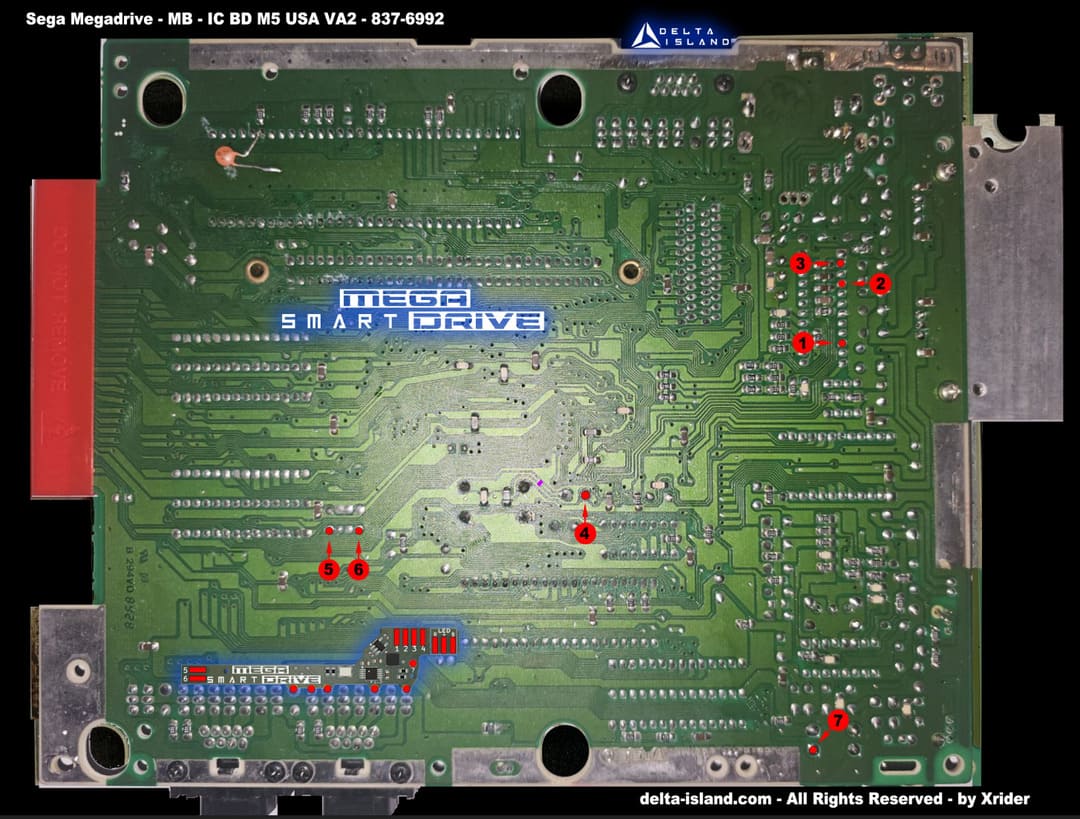
The Mega Drive 1 VA7 version requires an MD2 SmartDrive PCB.
 Fixez le SmartDrive MD2 avec un quality double-sided adhesive before wiring.
Sega Mega Drive 1 - IC BD MD 5 JAP - VA7 - 171-6217 - visual 1
Sega Mega Drive 1 - IC BD MD 5 PAL - VA5 & VA6 - 171-5963-30 - visual 2
Sega Mega Drive 1 - IC BD MD 5 PAL - VA5 & VA6 - 171-5963-30 - visual 3
Sega Mega Drive 1 - IC BD MD 5 PAL - VA5 & VA6 - 171-5963-30 - visual 4
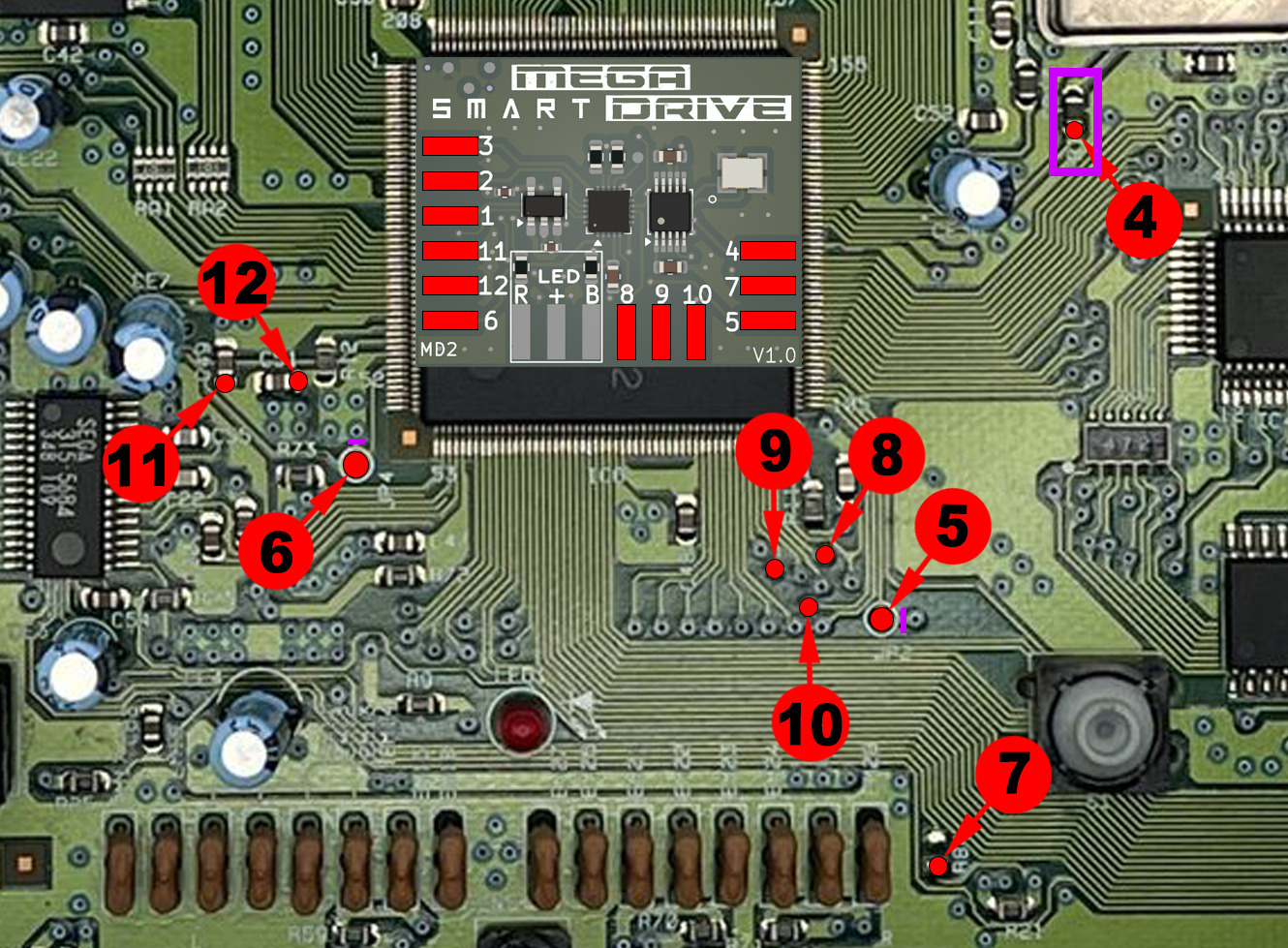
Sega Mega Drive 2 – PC BD MD2 USA – VA0 – 171-6349C-10
Dedicated installation diagram
Advanced micro-soldering:
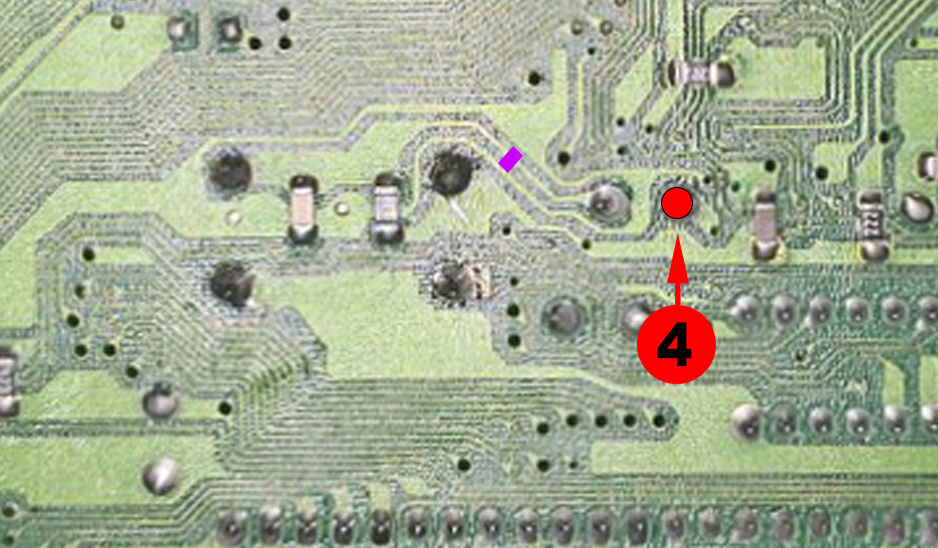
• Carefully cut the 2 traces marked in purple.
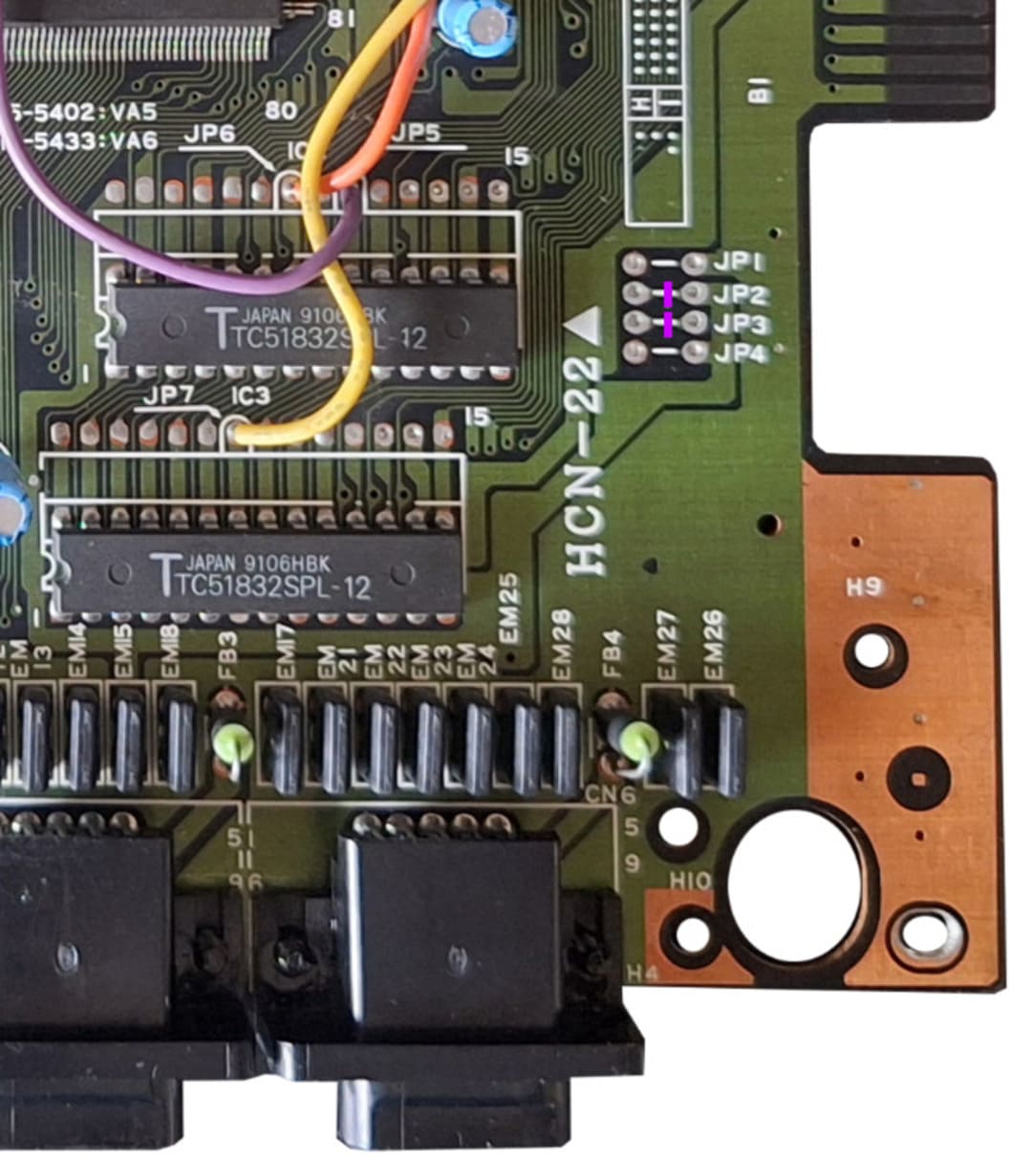
• If a jumper is present on JP3 or JP4, remove it.
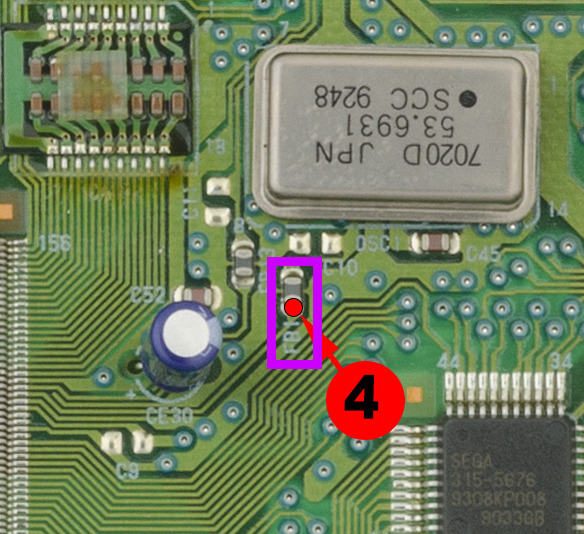
• Remove the SMD ferrite bead FB1 indicated on the diagram.
• Preferably use Kynar 30AWG and flux.
• Fix the SmartDrive MD2 with quality double-sided adhesive before wiring.
Recommended method:
To avoid stress on a fragile point:
1. First solder the wire to the SmartDrive board.
2. Then solder the other end to the previously tinned trace.
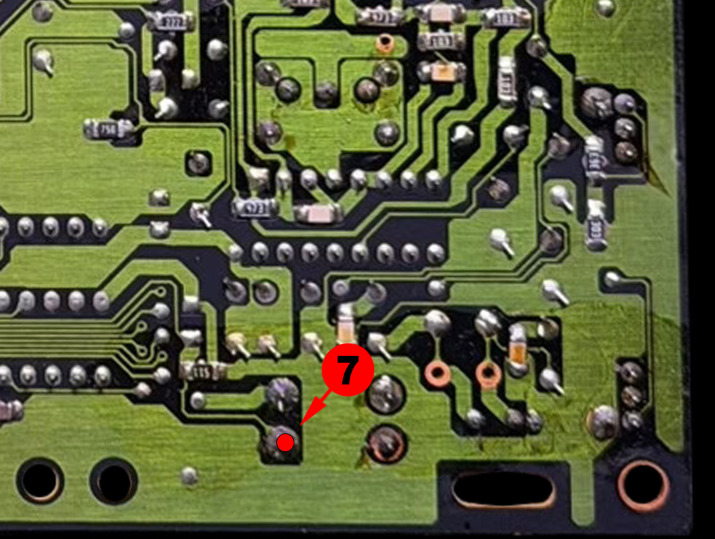
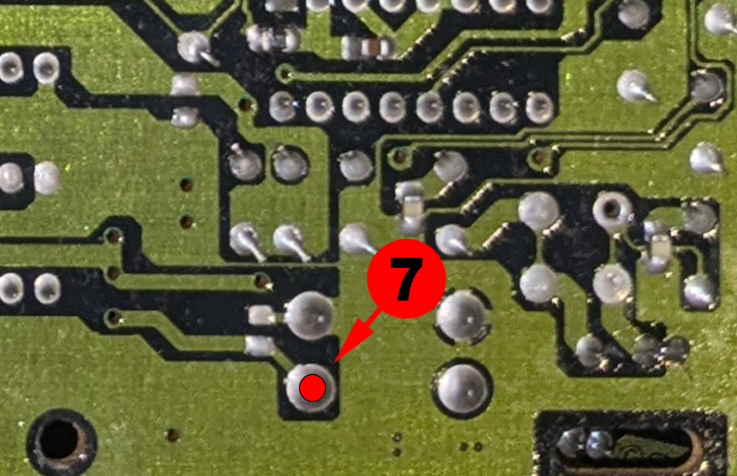
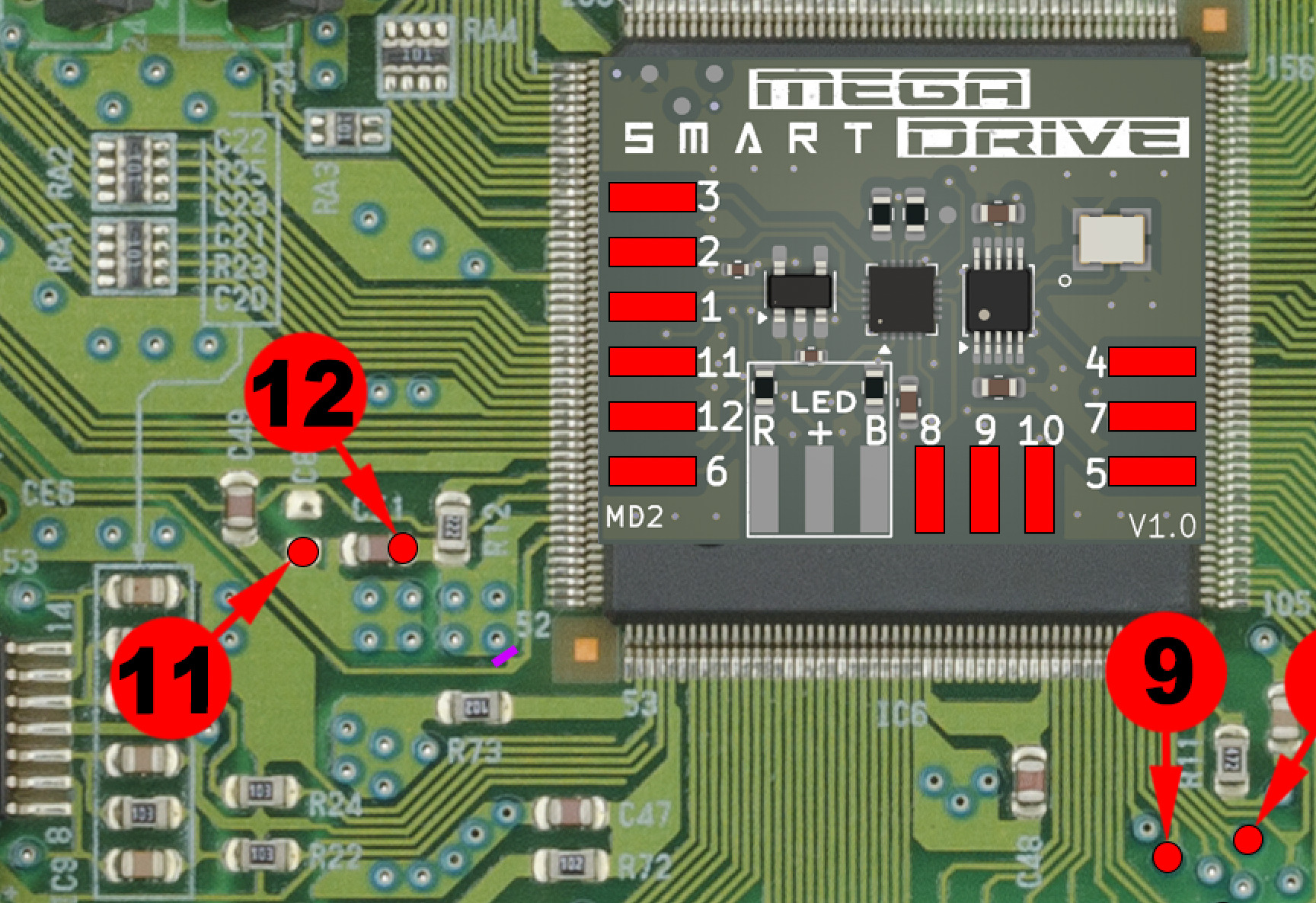
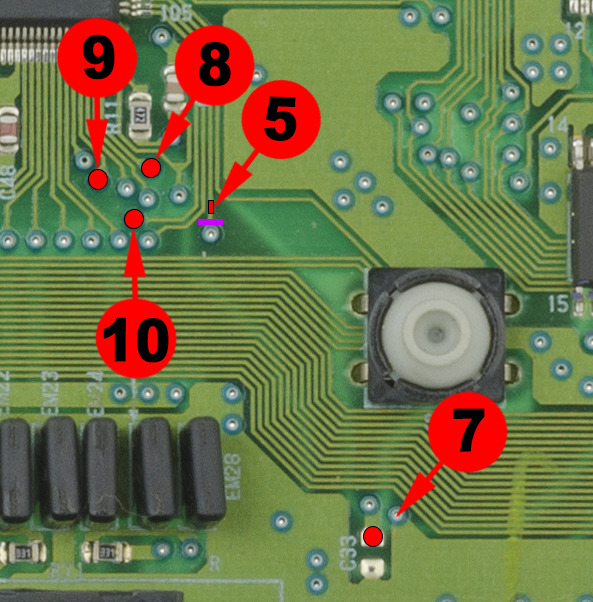
Points 8, 9 & 10:
These points require lightly scraping away the protective lacquer to expose the copper.
- Then tin the solder point with a small amount of solder.
- Using flux is strongly recommended to obtain a clean and reliable solder joint.
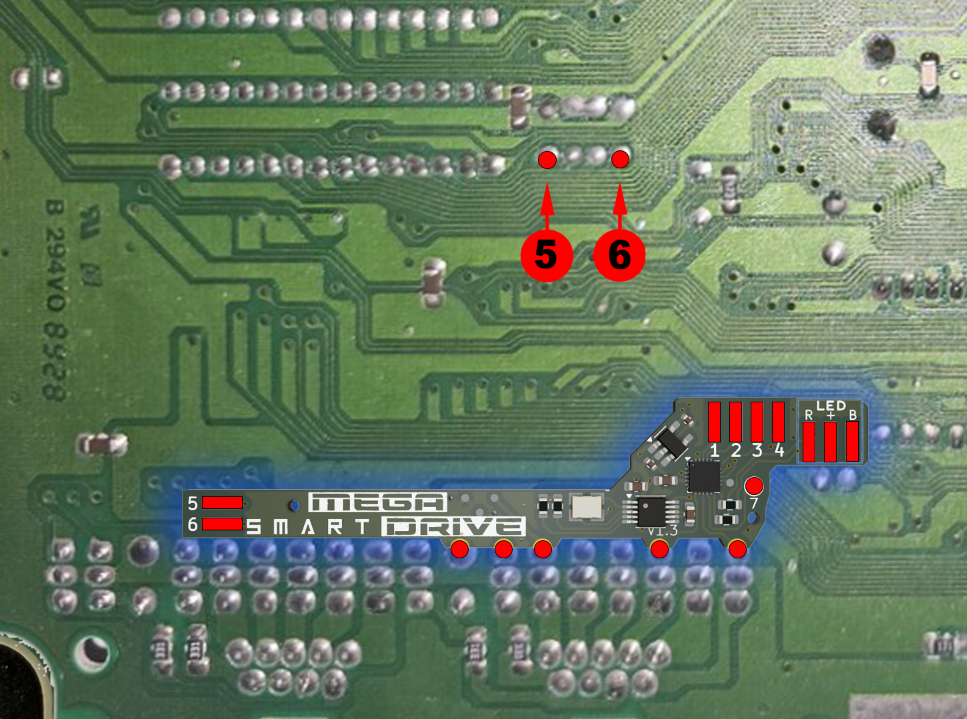
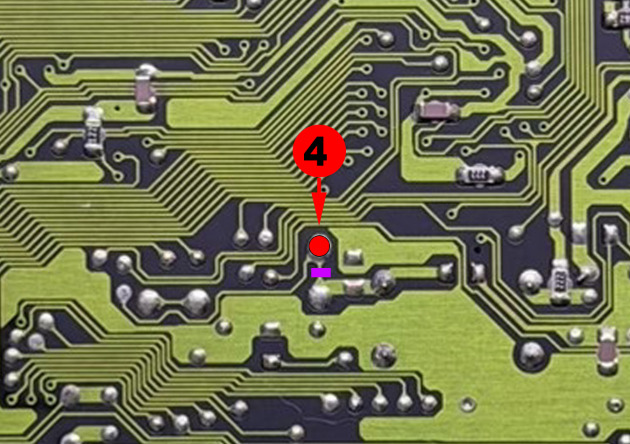
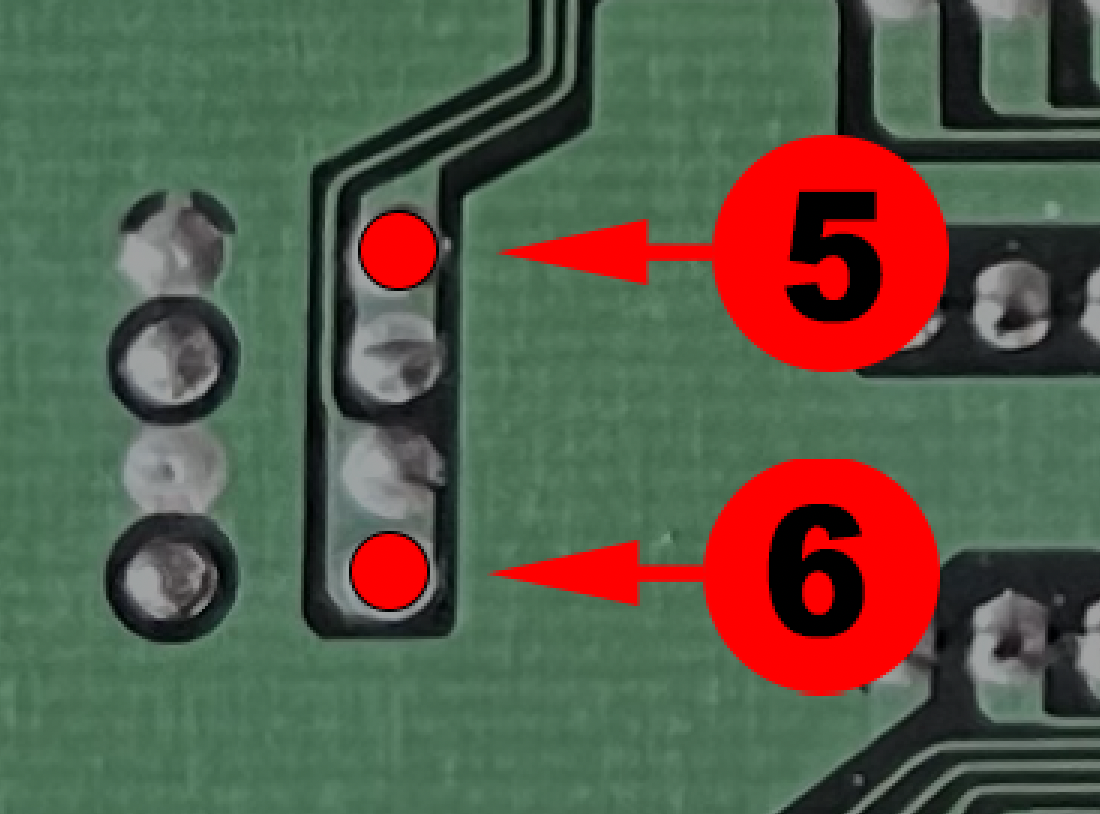
Point 5:
This point requires lightly scraping away the protective lacquer to expose the copper trace.
- Then tin the trace with a small amount of solder.
- Using flux is strongly recommended to obtain a clean and reliable solder joint.
Sega Mega Drive 2 – PC BD MD2 USA – VA0 – 171-6349C-10 - visual 1
Sega Mega Drive 2 – PC BD MD2 USA – VA0 – 171-6349C-10 - visual 2
Sega Mega Drive 2 – PC BD MD2 USA – VA0 – 171-6349C-10 - visual 3
Sega Mega Drive 2 – PC BD MD2 USA – VA0 – 171-6349C-10 - visual 4
Sega Mega Drive 2 – PC BD MD2 USA – VA0 – 171-6349C-10 - visual 5
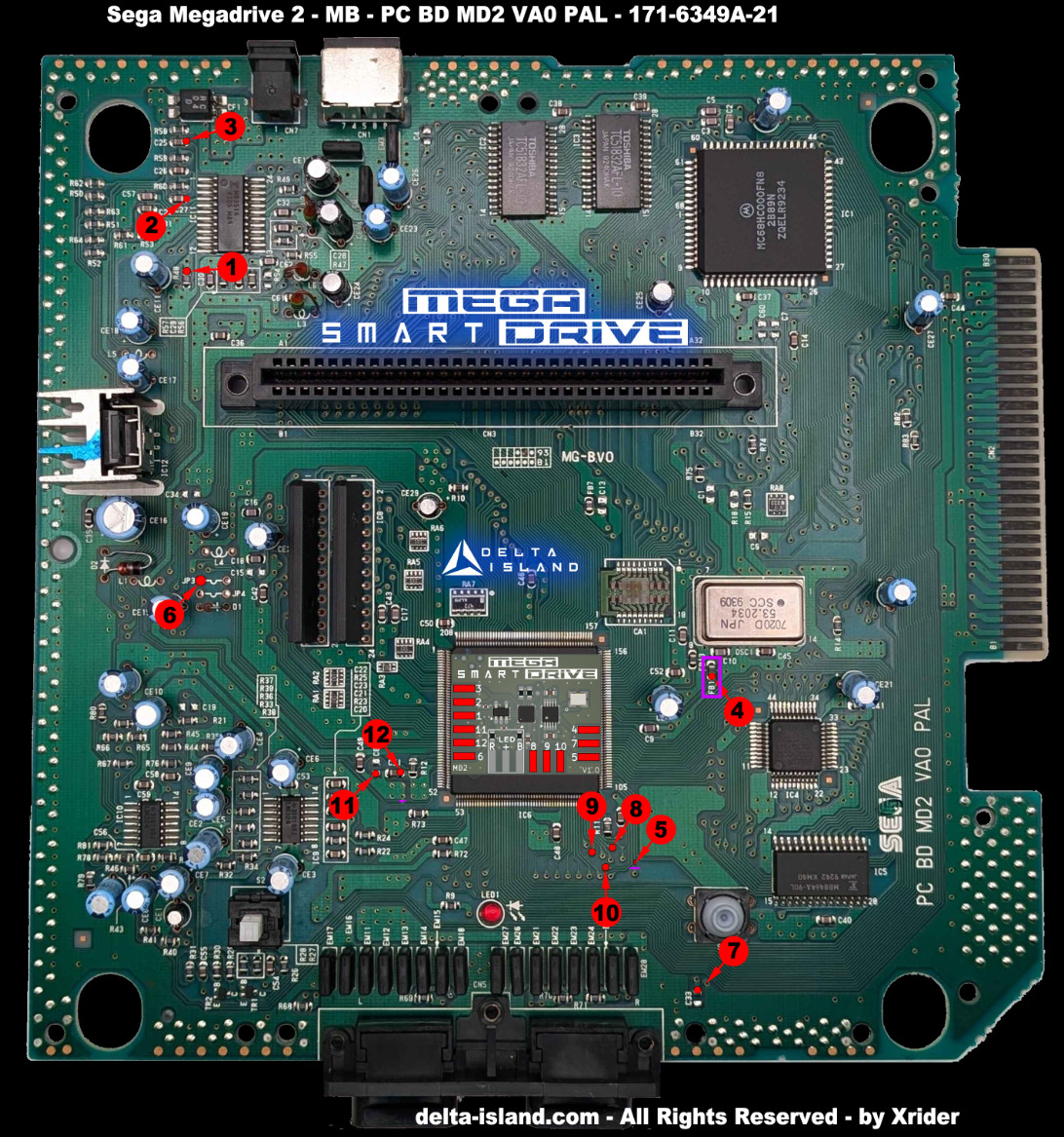
Sega Mega Drive 2 – PC BD MD2 PAL – VA0 – 171-6349A-21
Dedicated installation diagram
Advanced micro-soldering:
• Carefully cut the 2 traces marked in purple.
• If a jumper is present on JP3 or JP4, remove it.
• Remove the SMD ferrite bead FB1 if indicated on the diagram.
• Preferably use Kynar 30AWG and flux.
• Fix the SmartDrive MD2 with quality double-sided adhesive before wiring.
Recommended method:
To avoid stress on a fragile point:
1. First solder the wire to the SmartDrive board.
2. Then solder the other end to the previously tinned trace.
Points 8, 9 & 10:
These points require lightly scraping away the protective lacquer to expose the copper.
- Then tin the solder point with a small amount of solder.
- Using flux is strongly recommended to obtain a clean and reliable solder joint.
Point 5:
This point requires lightly scraping away the protective lacquer to expose the copper trace.
- Then tin the trace with a small amount of solder.
- Using flux is strongly recommended to obtain a clean and reliable solder joint.
Sega Mega Drive 2 – PC BD MD2 PAL – VA0 – 171-6349A-21 - visual 1
Sega Mega Drive 2 – PC BD MD2 PAL – VA0 – 171-6349A-21 - visual 2
Sega Mega Drive 2 – PC BD MD2 PAL – VA0 – 171-6349A-21 - visual 3
Sega Mega Drive 2 – PC BD MD2 PAL – VA0 – 171-6349A-21 - visual 4
Sega Mega Drive 2 – PC BD MD2 JAP – VA1 – 171-6534A
Dedicated installation diagram
Advanced micro-soldering:
• Coupez soigneusement les 2 traces marked in purple.
• If a jumper is present on JP3 ou JP4, retirez-le.
• Preferably use Kynar 30AWG et du flux.
• Fixez le SmartDrive MD2 avec un quality double-sided adhesive before wiring.
Recommended method:
To avoid stress on a fragile point:
1. First solder the wire to the SmartDrive board.
2. Then solder the other end to the previously tinned trace.
Points 8, 9 & 10:
These points require lightly scraping away the protective lacquer to expose the copper.
- Then tin the solder point with a small amount of solder.
- Using flux is strongly recommended to obtain a clean and reliable solder joint.
Point 5:
This point requires lightly scraping away the protective lacquer to expose the copper trace.
- Then tin the trace with a small amount of solder.
- Using flux is strongly recommended to obtain a clean and reliable solder joint.
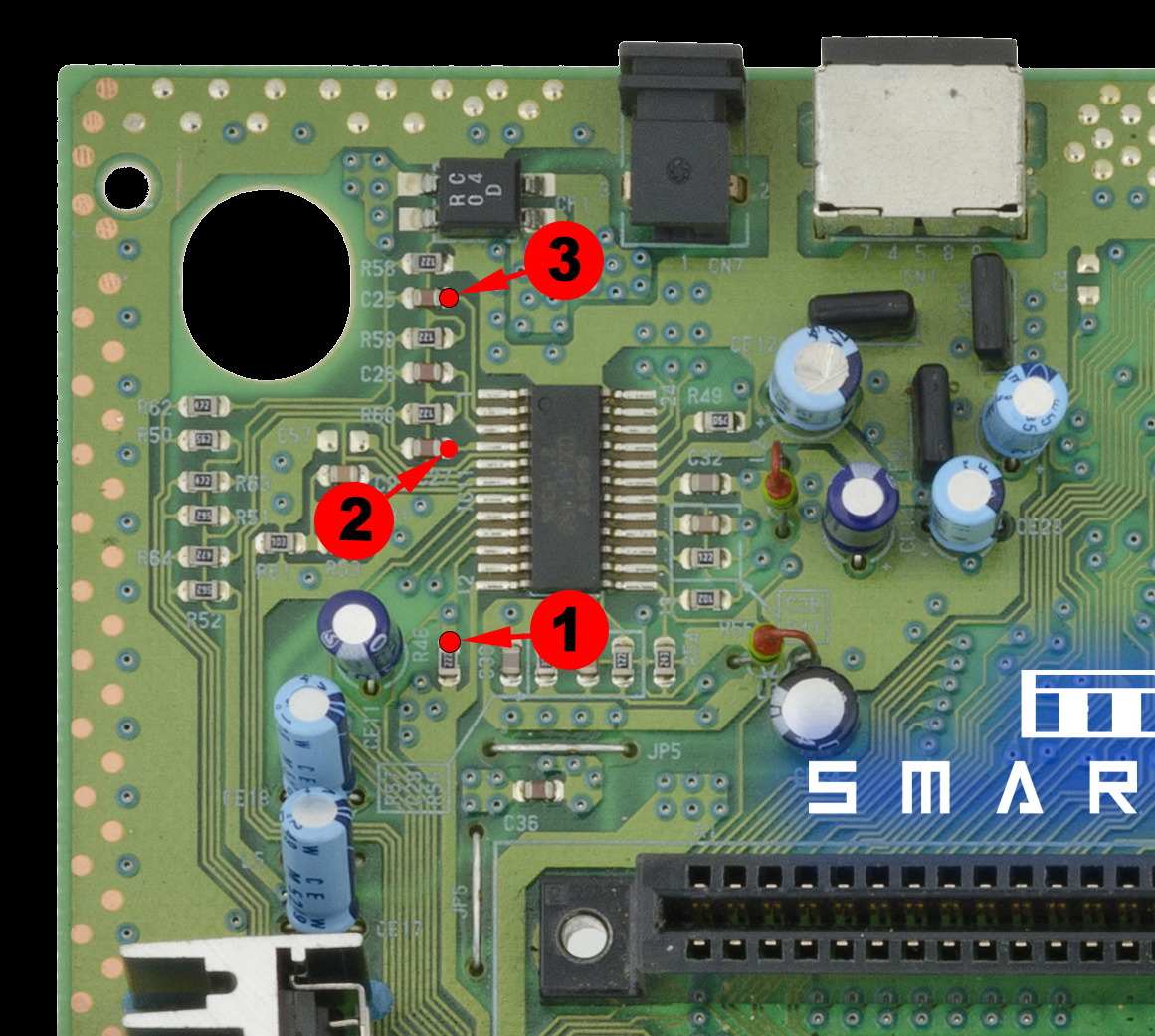
Sega Mega Drive 2 – PC BD MD2 JAP – VA1 – 171-6534A - visual 1
Sega Mega Drive 2 – PC BD MD2 JAP – VA1 – 171-6534A - visual 2
Sega Mega Drive 2 – PC BD MD2 JAP – VA1 – 171-6534A - visual 3
Sega Mega Drive 2 – PC BD MD2 JAP – VA1 – 171-6534A - visual 4
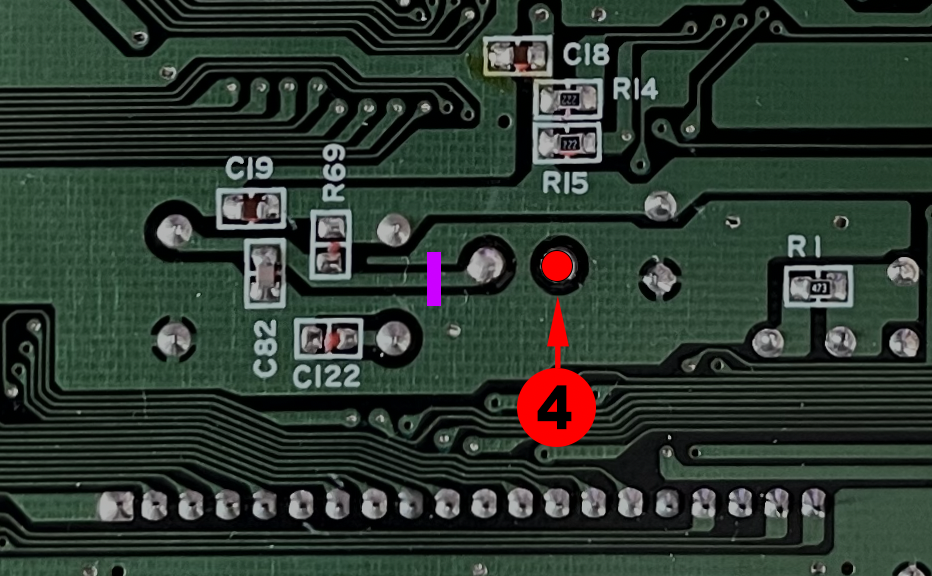
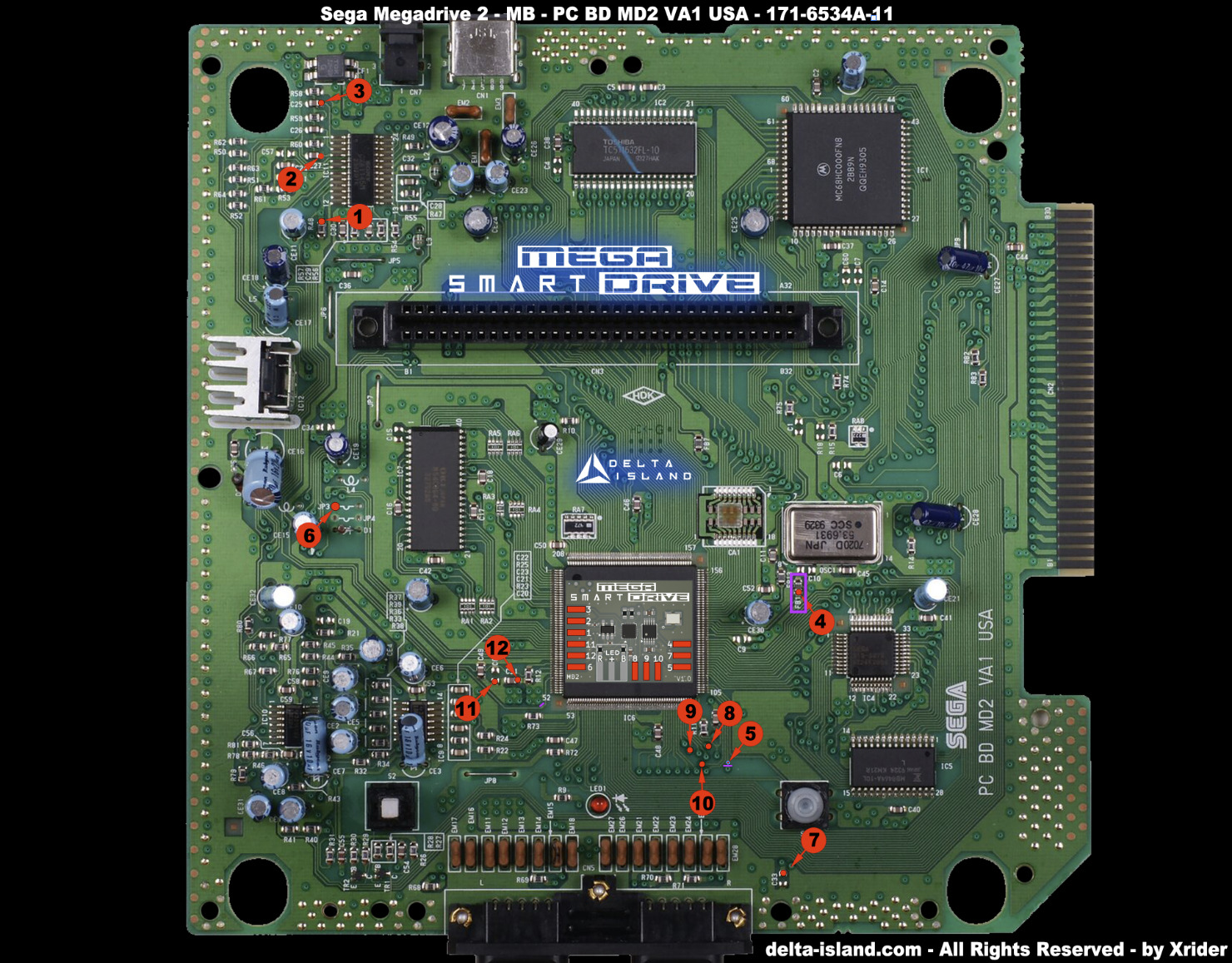
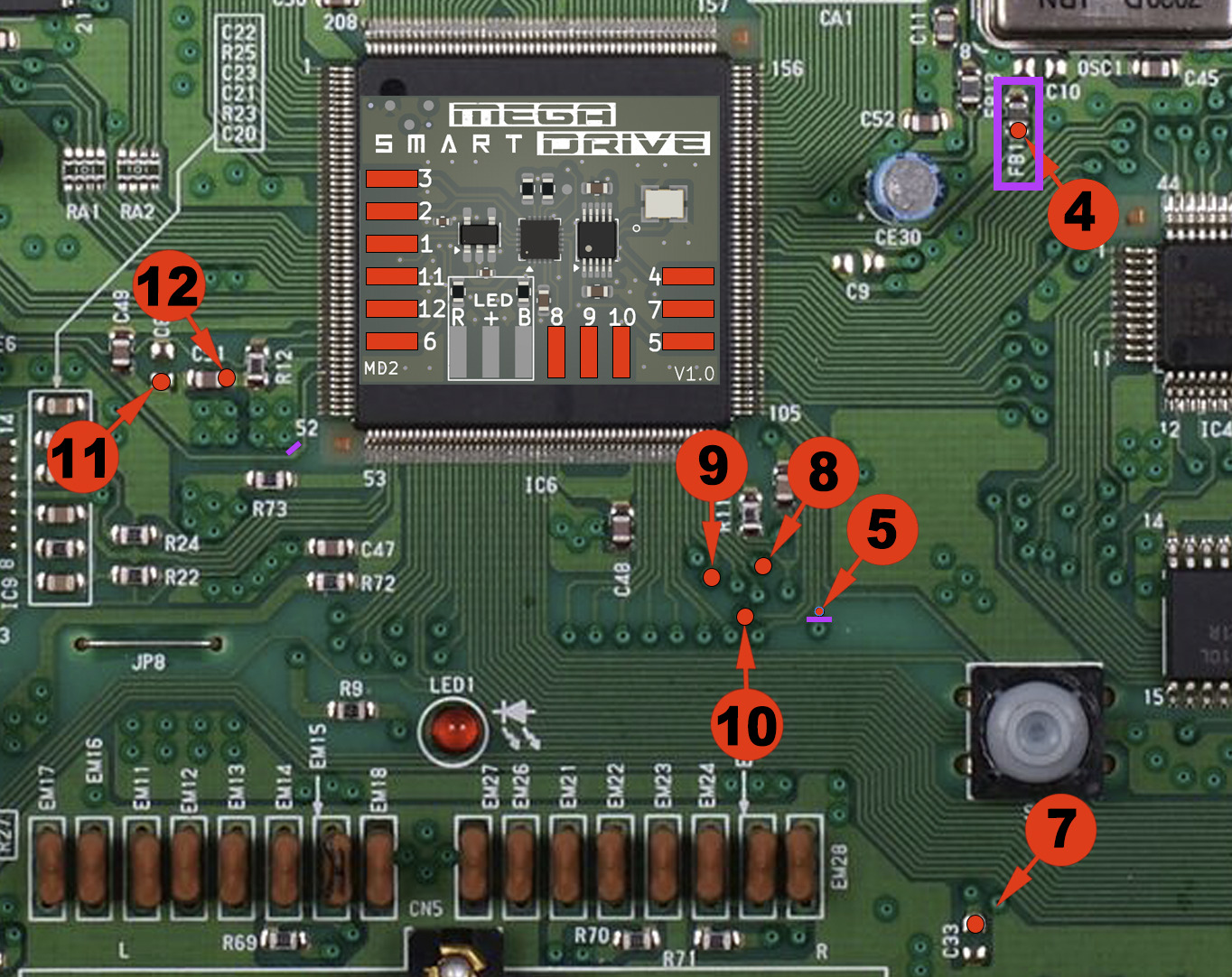
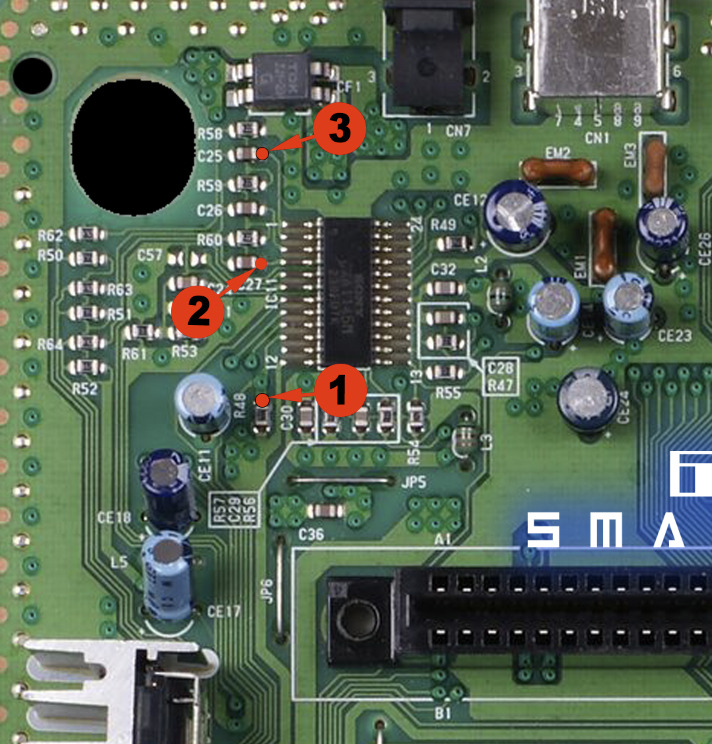
Sega Mega Drive 2 – PC BD MD2 USA – VA1 – 171-6534A-11
Dedicated installation diagram
Advanced micro-soldering:
• Carefully cut the 2 traces marked in purple.
• If a jumper is present on JP3 or JP4, remove it.
• Remove the SMD ferrite bead FB1 if indicated on the diagram.
• Preferably use Kynar 30AWG and flux.
• Fix the SmartDrive MD2 with quality double-sided adhesive before wiring.
Recommended method:
To avoid stress on a fragile point:
1. First solder the wire to the SmartDrive board.
2. Then solder the other end to the previously tinned trace.
Points 8, 9 & 10:
These points require lightly scraping away the protective lacquer to expose the copper.
- Then tin the solder point with a small amount of solder.
- Using flux is strongly recommended to obtain a clean and reliable solder joint.
Point 5:
This point requires lightly scraping away the protective lacquer to expose the copper trace.
- Then tin the trace with a small amount of solder.
- Using flux is strongly recommended to obtain a clean and reliable solder joint.
Sega Mega Drive 2 – PC BD MD2 USA – VA1 – 171-6534A-11 - visual 1
Sega Mega Drive 2 – PC BD MD2 USA – VA1 – 171-6534A-11 - visual 2
Sega Mega Drive 2 – PC BD MD2 USA – VA1 – 171-6534A-11 - visual 3
Sega Mega Drive 2 – PC BD MD2 USA – VA1 – 171-6534A-11 - visual 4
Sega Mega Drive 2 – PC BD MD2 PAL – VA1 – 171-6534A-21
Dedicated installation diagram
Advanced micro-soldering:
• Carefully cut the 2 traces marked in purple.
• If a jumper is present on JP3, remove it.
• Remove the SMD ferrite bead FB1 if indicated on the diagram.
• Preferably use Kynar 30AWG and flux.
• Fix the SmartDrive MD2 with quality double-sided adhesive before wiring.
Recommended method:
To avoid stress on a fragile point:
1. First solder the wire to the SmartDrive board.
2. Then solder the other end to the previously tinned trace.
Points 8, 9 & 10:
These points require lightly scraping away the protective lacquer to expose the copper.
- Then tin the solder point with a small amount of solder.
- Using flux is strongly recommended to obtain a clean and reliable solder joint.
Point 5:
This point requires lightly scraping away the protective lacquer to expose the copper trace.
- Then tin the trace with a small amount of solder.
- Using flux is strongly recommended to obtain a clean and reliable solder joint.
Sega Mega Drive 2 – PC BD MD2 PAL – VA1 – 171-6534A-21 - visual 1
Sega Mega Drive 2 – PC BD MD2 PAL – VA1 – 171-6534A-21 - visual 2
Sega Mega Drive 2 – PC BD MD2 PAL – VA1 – 171-6534A-21 - visual 3
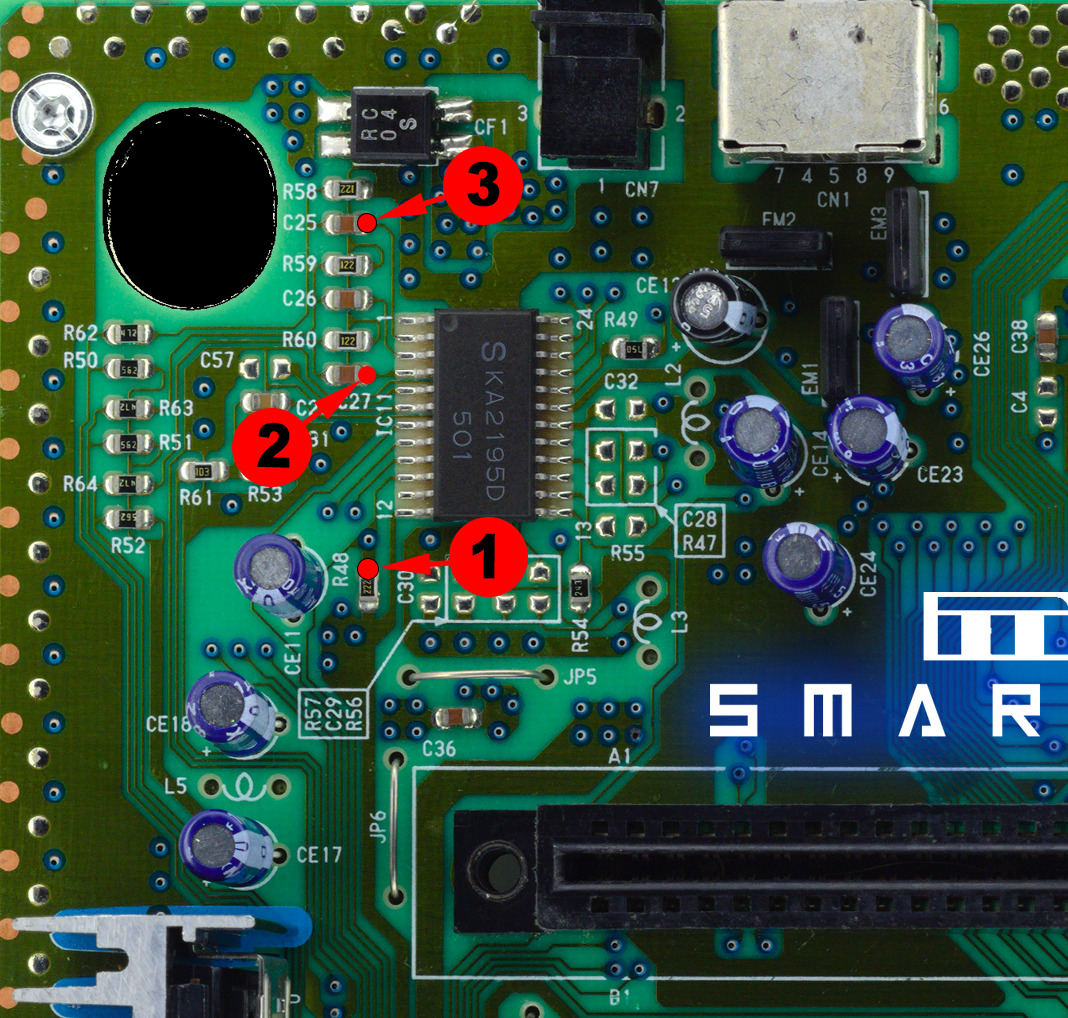
Sega Mega Drive 2 – PC BD MD2 USA – VA1.8 – 171-6534B
Dedicated installation diagram
Advanced micro-soldering:
• Carefully cut the 2 traces marked in purple.
• If a jumper is present on JP3 or JP4, remove it.
• Remove the SMD ferrite bead FB1 if indicated on the diagram.
• Preferably use Kynar 30AWG and flux.
• Fix the SmartDrive MD2 with quality double-sided adhesive before wiring.
Recommended method:
To avoid stress on a fragile point:
1. First solder the wire to the SmartDrive board.
2. Then solder the other end to the previously tinned trace.
Points 8, 9 & 10:
These points require lightly scraping away the protective lacquer to expose the copper.
- Then tin the solder point with a small amount of solder.
- Using flux is strongly recommended to obtain a clean and reliable solder joint.
Point 5:
This point requires lightly scraping away the protective lacquer to expose the copper trace.
- Then tin the trace with a small amount of solder.
- Using flux is strongly recommended to obtain a clean and reliable solder joint.
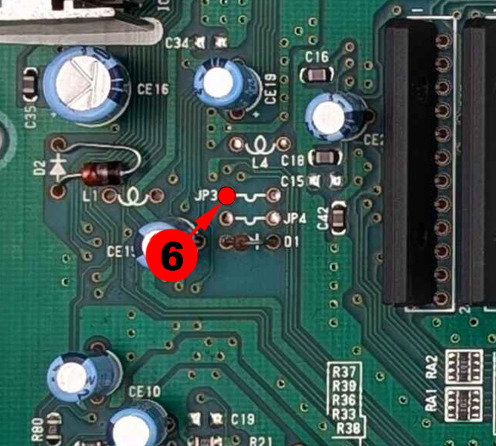
Sega Mega Drive 2 – PC BD MD2 USA – VA1.8 – 171-6534B - visual 1
Sega Mega Drive 2 – PC BD MD2 USA – VA1.8 – 171-6534B - visual 2
Sega Mega Drive 2 – PC BD MD2 USA – VA1.8 – 171-6534B - visual 3
Sega Mega Drive 2 – PC BD MD2 USA – VA1.8 – 171-6534B - visual 4
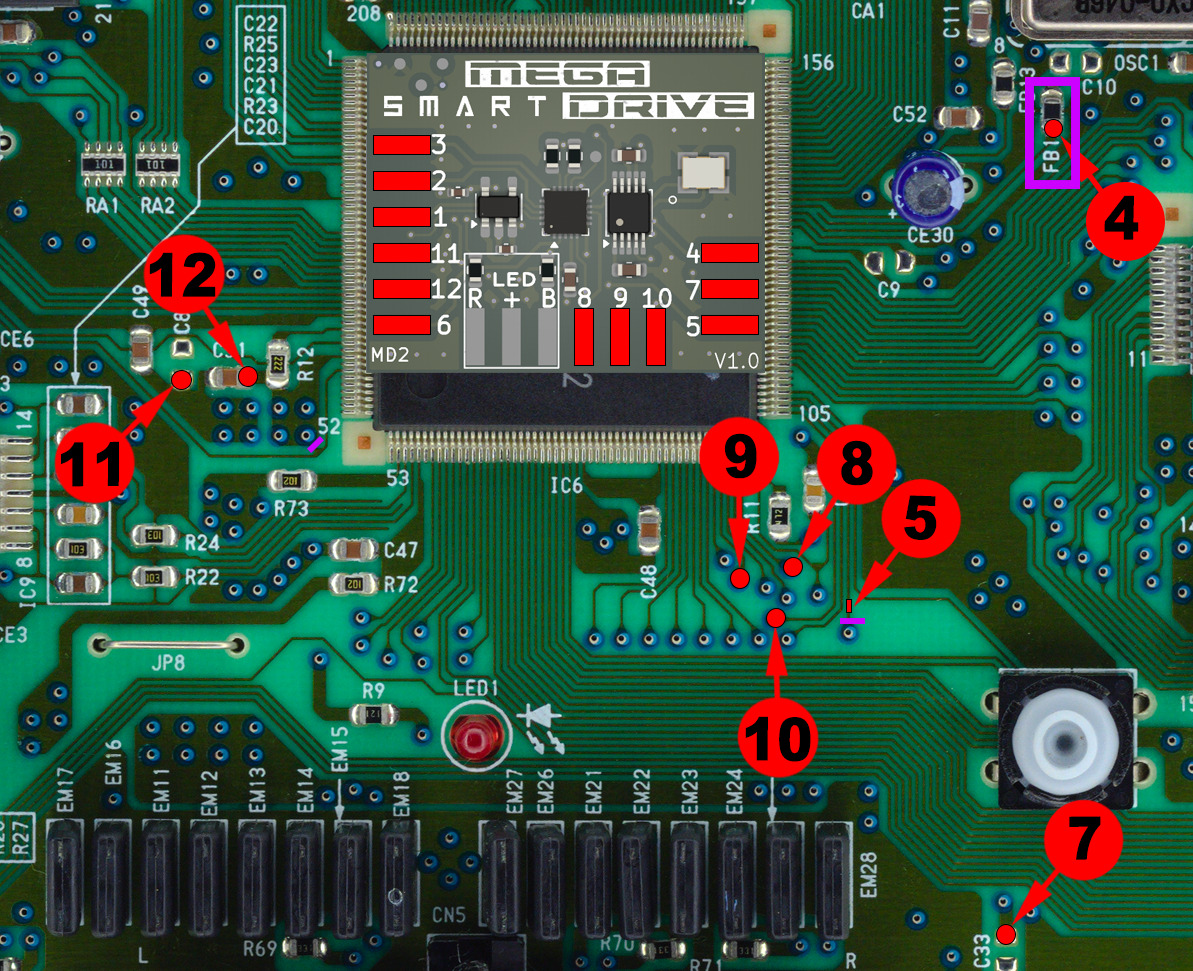
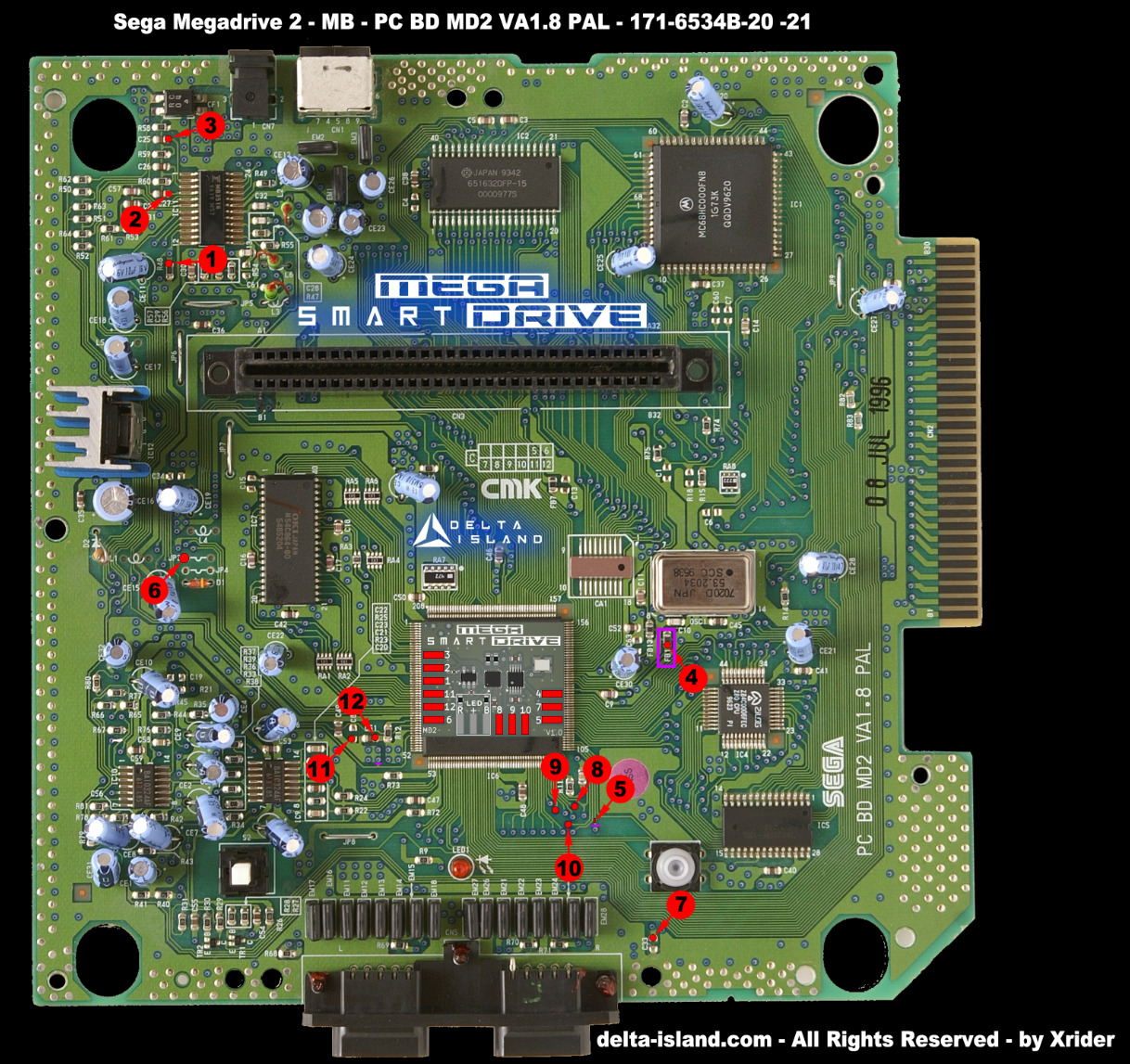
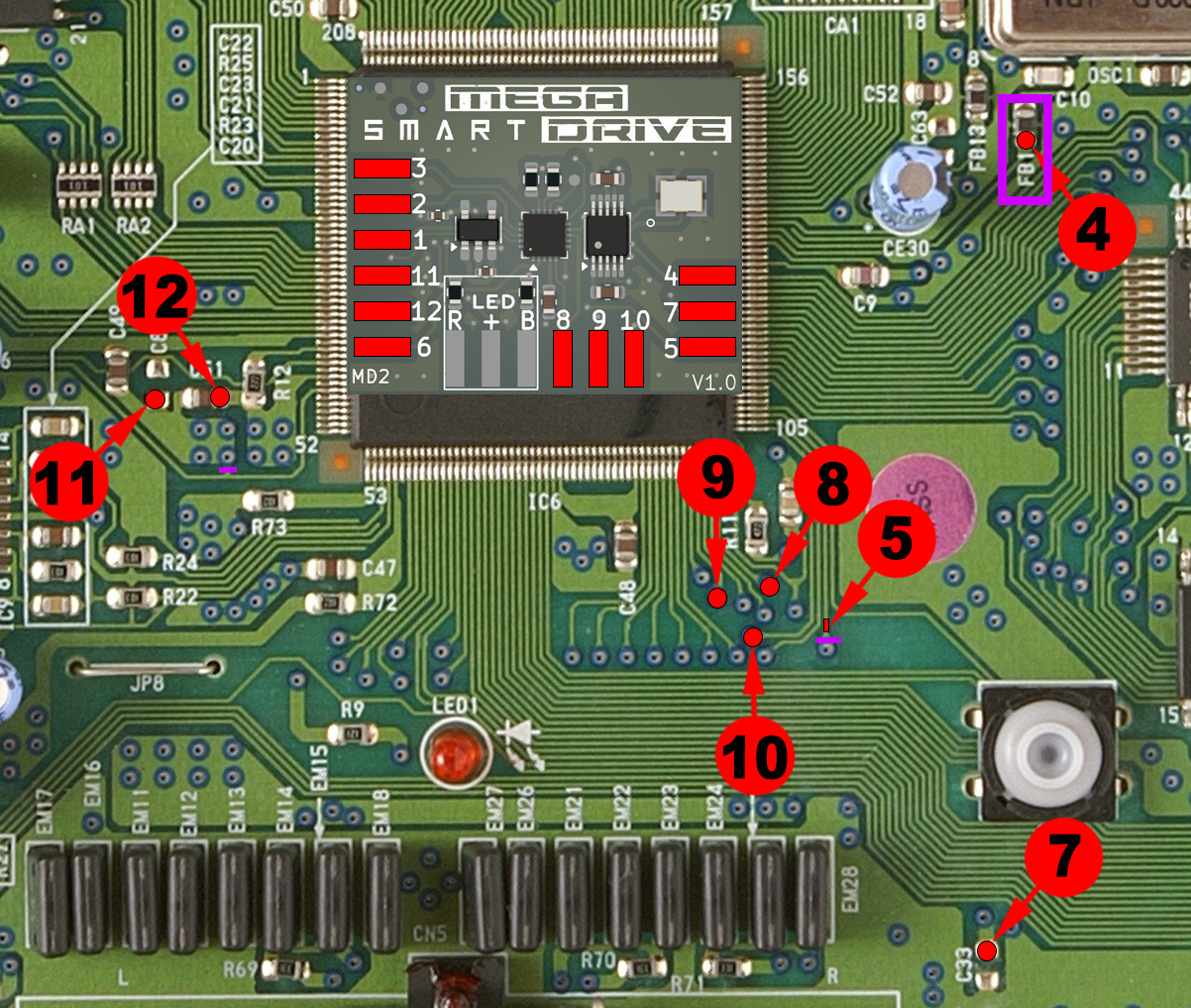
Sega Mega Drive 2 – PC BD MD2 PAL – VA1.8 – 171-6534B-20 - 171-6534B-21
Dedicated installation diagram
Advanced micro-soldering:
• Coupez soigneusement les 2 traces marked in purple.
• If a jumper is present on JP3 ou JP4, retirez-le.
• Remove the SMD ferrite bead FB1 if indicated on the diagram.
• Preferably use Kynar 30AWG et du flux.
• Fixez le SmartDrive MD2 avec un quality double-sided adhesive before wiring.

Recommended method:
To avoid stress on a fragile point:
1. First solder the wire to the SmartDrive board.
2. Then solder the other end to the previously tinned trace.
Points 8, 9 & 10:
These points require lightly scraping away the protective lacquer to expose the copper.
- Then tin the solder point with a small amount of solder.
- Using flux is strongly recommended to obtain a clean and reliable solder joint.
Point 5:
This point requires lightly scraping away the protective lacquer to expose the copper trace.
- Then tin the trace with a small amount of solder.
- Using flux is strongly recommended to obtain a clean and reliable solder joint.
Sega Mega Drive 2 – PC BD MD2 PAL – VA1.8 – 171-6534B-20 - 171-6534B-21 - visual 1
Sega Mega Drive 2 – PC BD MD2 PAL – VA1.8 – 171-6534B-20 - 171-6534B-21 - visual 2
Sega Mega Drive 2 – PC BD MD2 PAL – VA1.8 – 171-6534B-20 - 171-6534B-21 - visual 3
Sega Mega Drive 2 – PC BD MD2 PAL – VA1.8 – 171-6534B-20 - 171-6534B-21 - visual 4
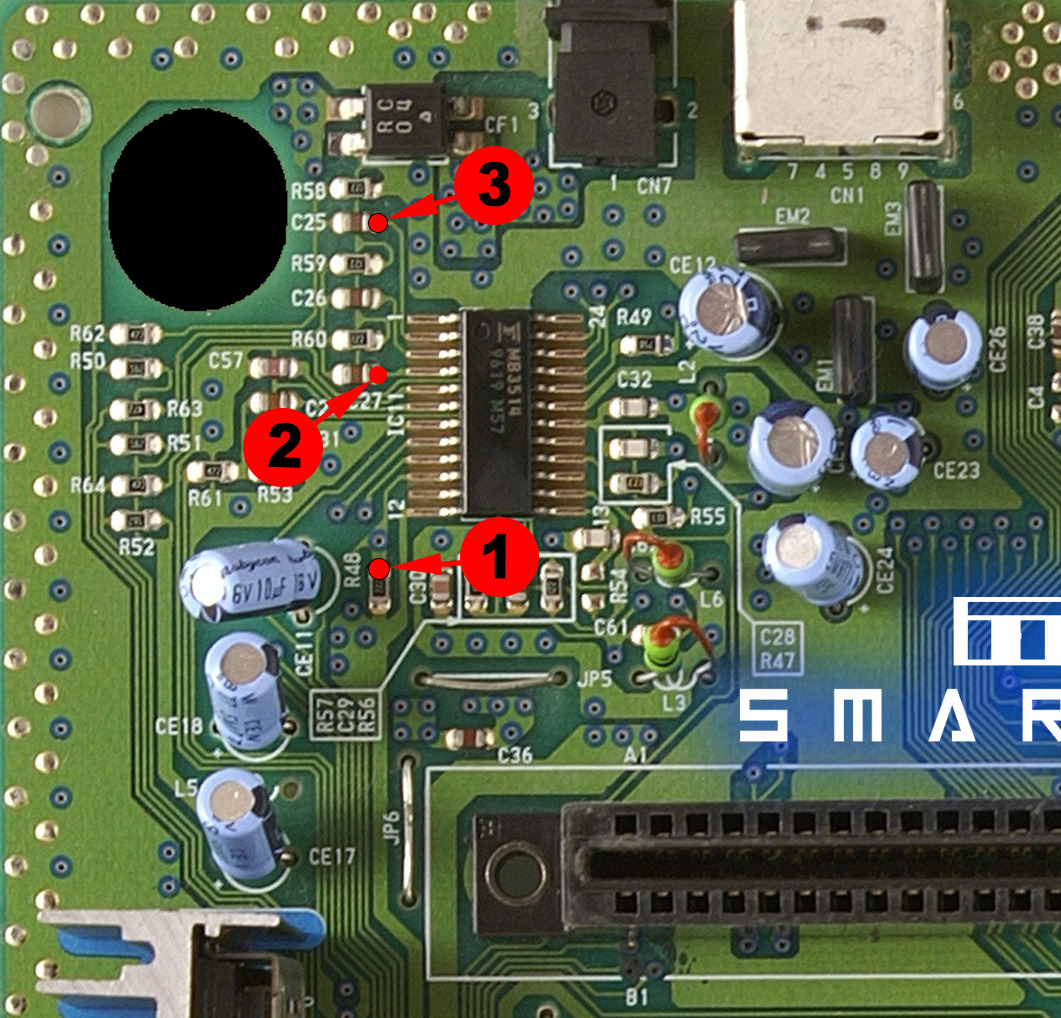
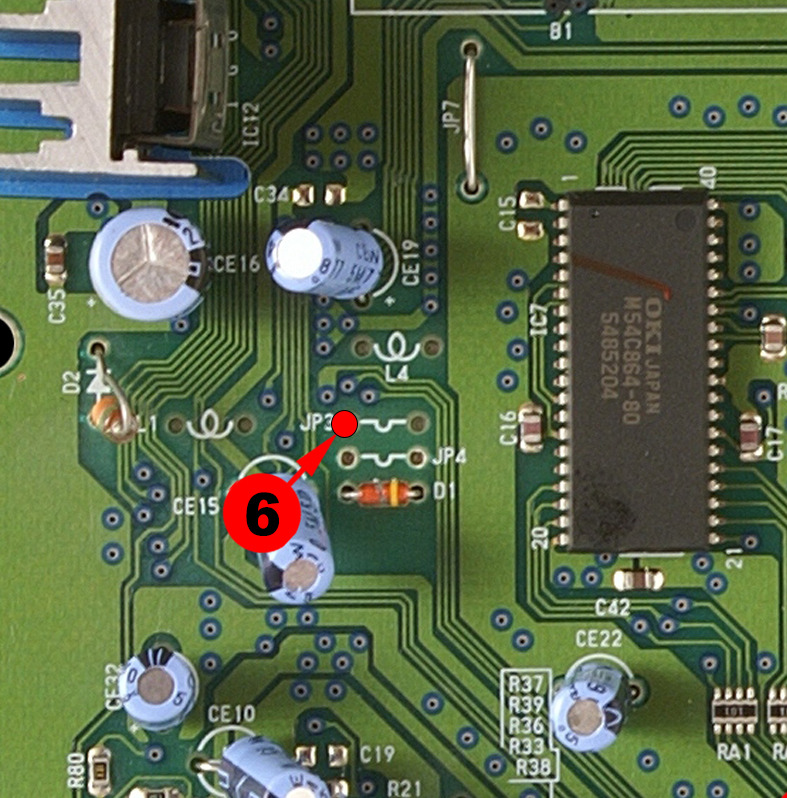
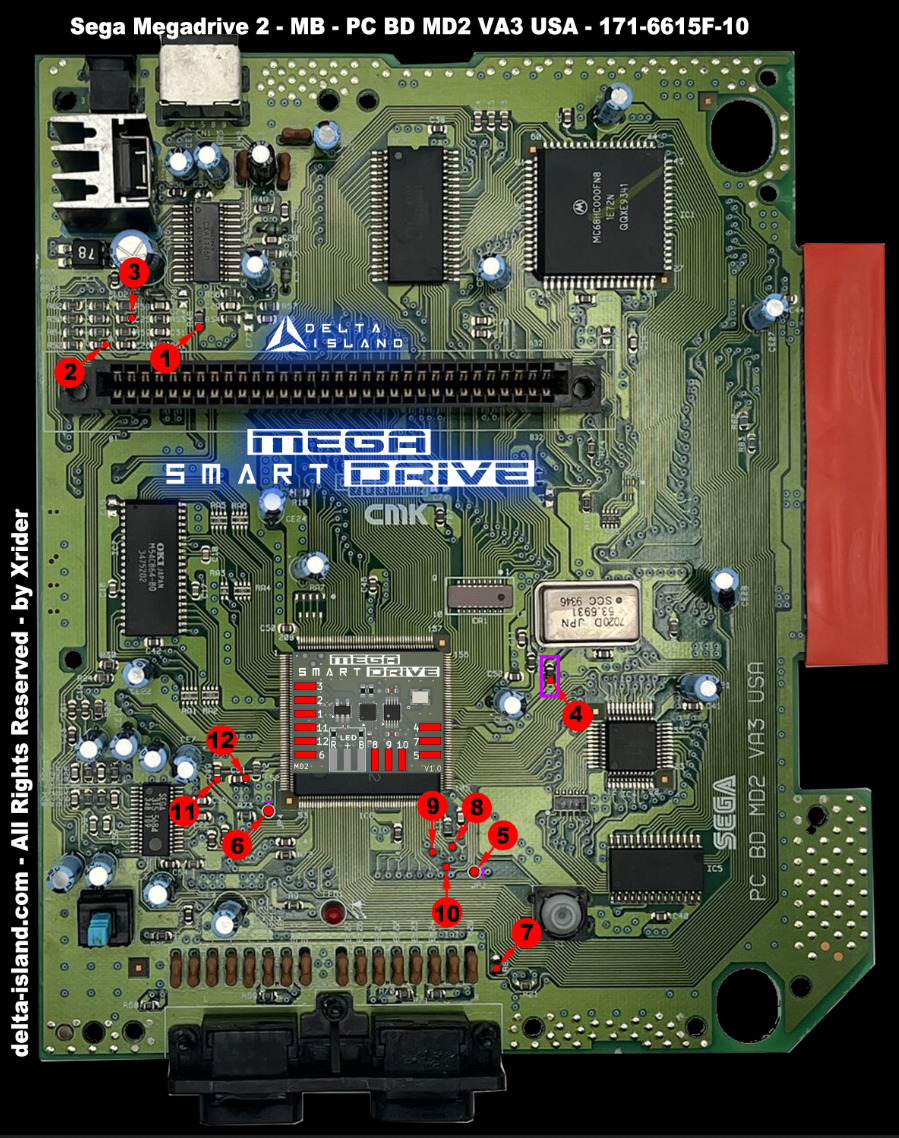
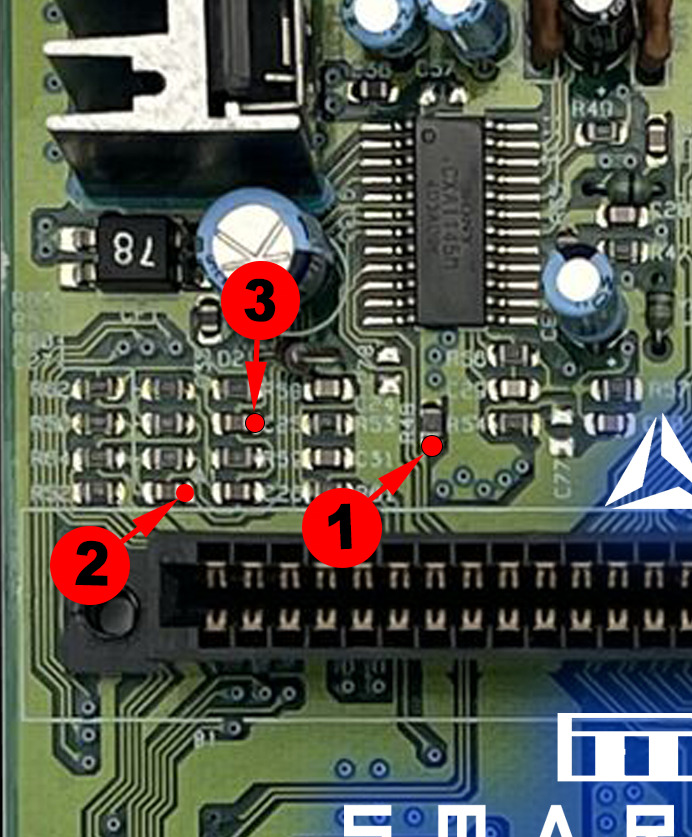
Sega Mega Drive 2 – PC BD MD2 PAL – VA3 – 171-6615F-10
Dedicated installation diagram
Advanced micro-soldering:
• Carefully cut the 2 traces marked in purple.
• Remove the SMD ferrite bead FB1 if indicated on the diagram.
• Preferably use Kynar 30AWG and flux.
• Scrape and tin the marked points/traces before soldering.
• Fix the SmartDrive MD2 with quality double-sided adhesive before wiring.
Recommended method:
To avoid stress on a fragile point:
1. First solder the wire to the SmartDrive board.
2. Then solder the other end to the previously tinned trace.
Points 8, 9 & 10:
These points require lightly scraping away the protective lacquer to expose the copper.
- Then tin the solder point with a small amount of solder.
- Using flux is strongly recommended to obtain a clean and reliable solder joint.
Sega Mega Drive 2 – PC BD MD2 PAL – VA3 – 171-6615F-10 - visual 1
Sega Mega Drive 2 – PC BD MD2 PAL – VA3 – 171-6615F-10 - visual 2
Sega Mega Drive 2 – PC BD MD2 PAL – VA3 – 171-6615F-10 - visual 3
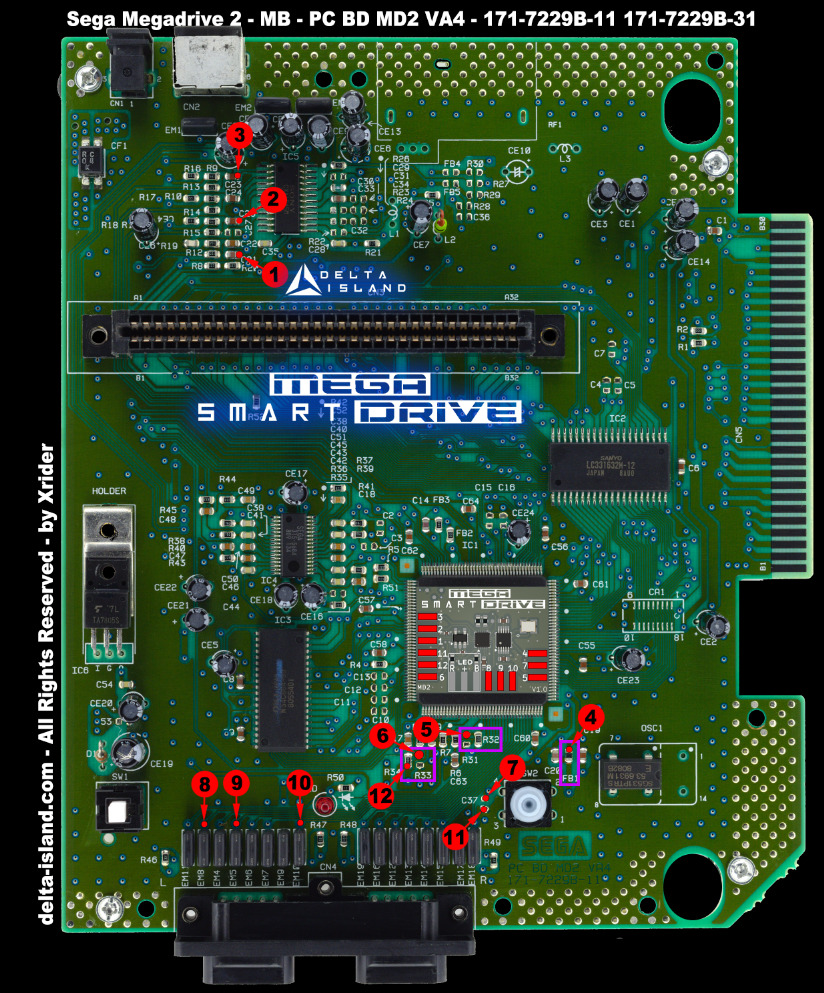
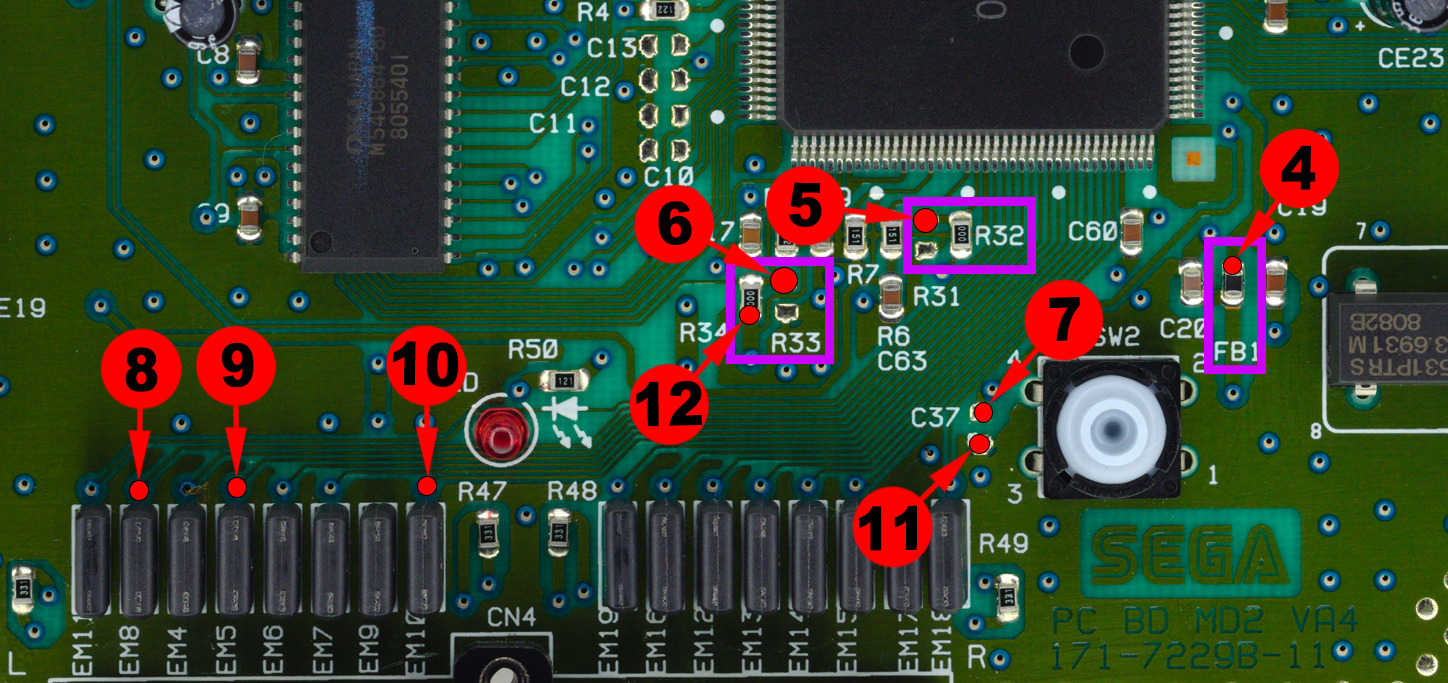
Sega Mega Drive 2 – PC BD MD2 JPN - USA - PAL – VA4 – 171-7229B-11 -31
Dedicated installation diagram
Advanced micro-soldering:
• Remove the components R32, R33 and FB1 indicated on the diagram.
• Preferably use Kynar 30AWG and flux.
• Fix the SmartDrive MD2 with quality double-sided adhesive before wiring.
Recommended method:
To avoid stress on a fragile point:
1. First solder the wire to the SmartDrive board.
2. Then solder the other end to the previously tinned trace.
Points 8, 9 & 10:
These points require lightly scraping away the protective lacquer to expose the copper.
- Then tin the solder point with a small amount of solder.
- Using flux is strongly recommended to obtain a clean and reliable solder joint.
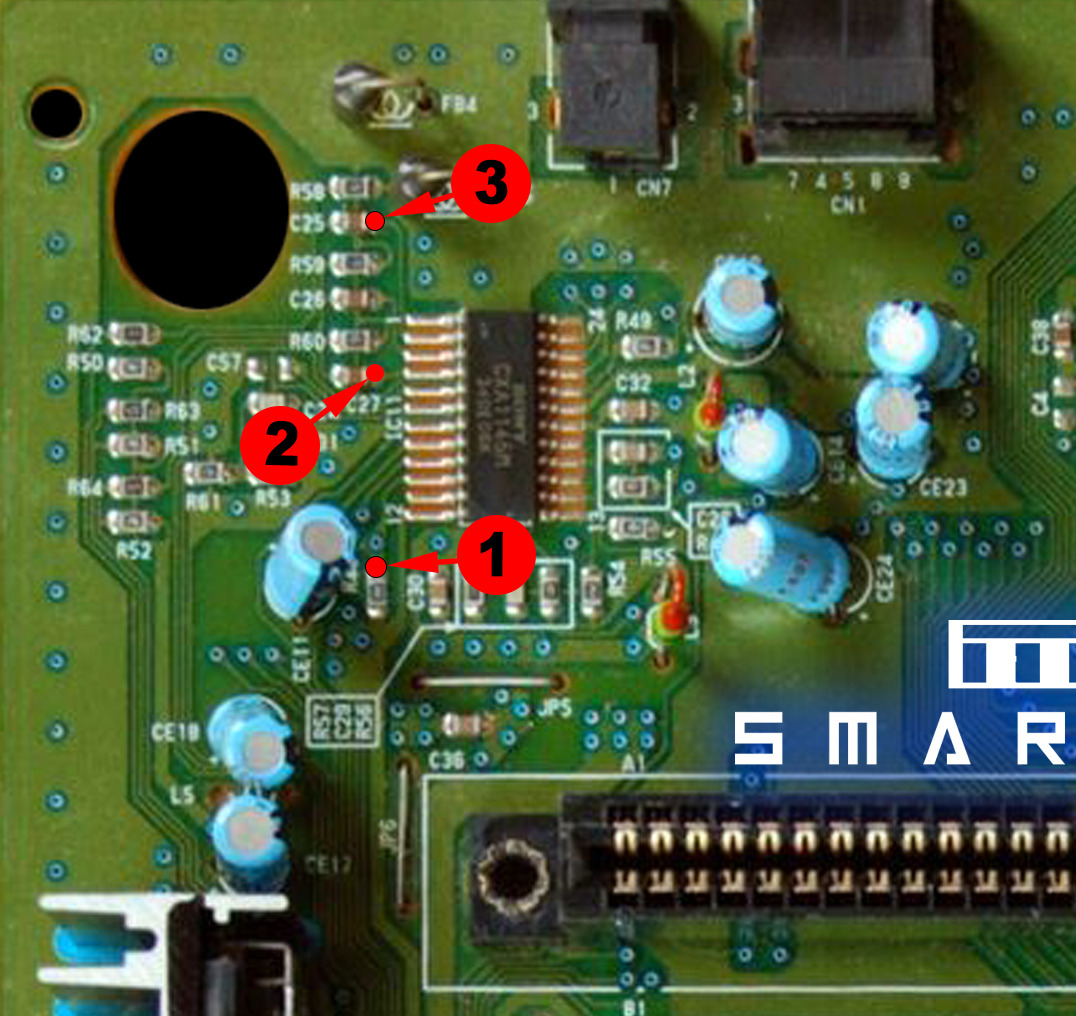
Sega Mega Drive 2 – PC BD MD2 JPN - USA - PAL – VA4 – 171-7229B-11 -31 - visual 1
Sega Mega Drive 2 – PC BD MD2 JPN - USA - PAL – VA4 – 171-7229B-11 -31 - visual 2
Sega Mega Drive 2 – PC BD MD2 JPN - USA - PAL – VA4 – 171-7229B-11 -31 - visual 3

🎮 4 - How Delta SmartDrive works

Une fois le Delta SmartDrive installed, your Sega Mega Drive / Genesis console becomes capable of easily handling regions PAL / USA / JAP ainsi que les frequencys 50Hz / 60Hz. Le changement de mode peut s’effectuer soit via la controller Player 1, soit via le bouton RESET de la console.

Please note: a colored bar briefly appears on screen to indicate the active mode. If a bi-color LED has been installed, it will also reflect the selected region.
 

4.1 - Changement de region (PAL / USA / JAP) et de frequency (50Hz / 60Hz) via la controller

1. Insert a game cartridge et allumez la console.
2. Using the controller Player 1, maintenez A + B + C + START pendant environ 3 secondes.
3. Une color bar appears on screen as an overlay, along with the color of the LED if it is installed.
4. The colors cycle according to the active mode:
RED = PAL / 50Hz
BLUE = USA / 60Hz
PURPLE = JAP / 60Hz
5. Release the buttons when the desired color appears.
6. Each time the console starts, the regional color bar briefly indicates the currently active mode.
Reminder: a fixe ou clignotant de la color bar permet d’indiquer le mode Normal ou Overclock (see chapter 4.3 if enabled on your version).
Delta SmartDrive - Changement de region et frequency via la controller
Commande controller : maintenez A + B + C + START pendant 3 secondes.
 

4.2 - Selecting PAL / USA / JAP regions and 50Hz / 60Hz frequencies using the RESET button

1. Insert a game cartridge et allumez la console.
2. Hold le bouton RESET de la console pendant environ 3 secondes.
3. Une color bar appears on screen as an overlay, along with the color of the LED if it is installed.
4. The colors then change according to the selected mode:
RED = PAL / 50Hz
BLUE = USA / 60Hz
PURPLE = JAP / 60Hz
5. Release the RESET button when the desired color appears.
6. At each restart, the color bar briefly reminds you of the active region mode.
Tip: this method is ideal if you want to quickly change region without using the button combination on the controller.
Delta SmartDrive - Region selection via RESET button
Console command: hold the RESET button for 3 seconds.
 

4.3 - In-Game Reset (IGR)

1. Insert a game cartridge et allumez la console.
2. Pendant le jeu, utilisez la controller Player 1.
3. Hold la combinaison DOWN + A + B + C + START pendant environ 3 secondes.
4. La console automatically reboots.
Convenient: this function allows you to quickly reboot the console without using the physical button, significantly improving everyday ease of use.
Delta SmartDrive - In Game Reset via controller
In-Game Reset: hold DOWN + A + B + C + START for 3 seconds.
 

❓ FAQ – Frequently Asked Questions

I switch from PAL to NTSC during gameplay and notice bugs or slowdowns. Is this normal?
Yes. Some games do not handle on-the-fly frequency changes well. It is recommended to turn the console off and back on after selecting the desired mode. The Mega SmartDrive remembers the last configuration used.
Why was the Overclock function not retained?
The function was developed, but it was disabled because of incompatibilities observed on certain motherboard revisions. The choice was made to prioritize overall stability.
A colored bar appears at startup, above the TMSS message. Is this normal?
Yes. This bar briefly indicates the active region / frequency at startup.
I use the bi-color LED. Can I disable the OSD?
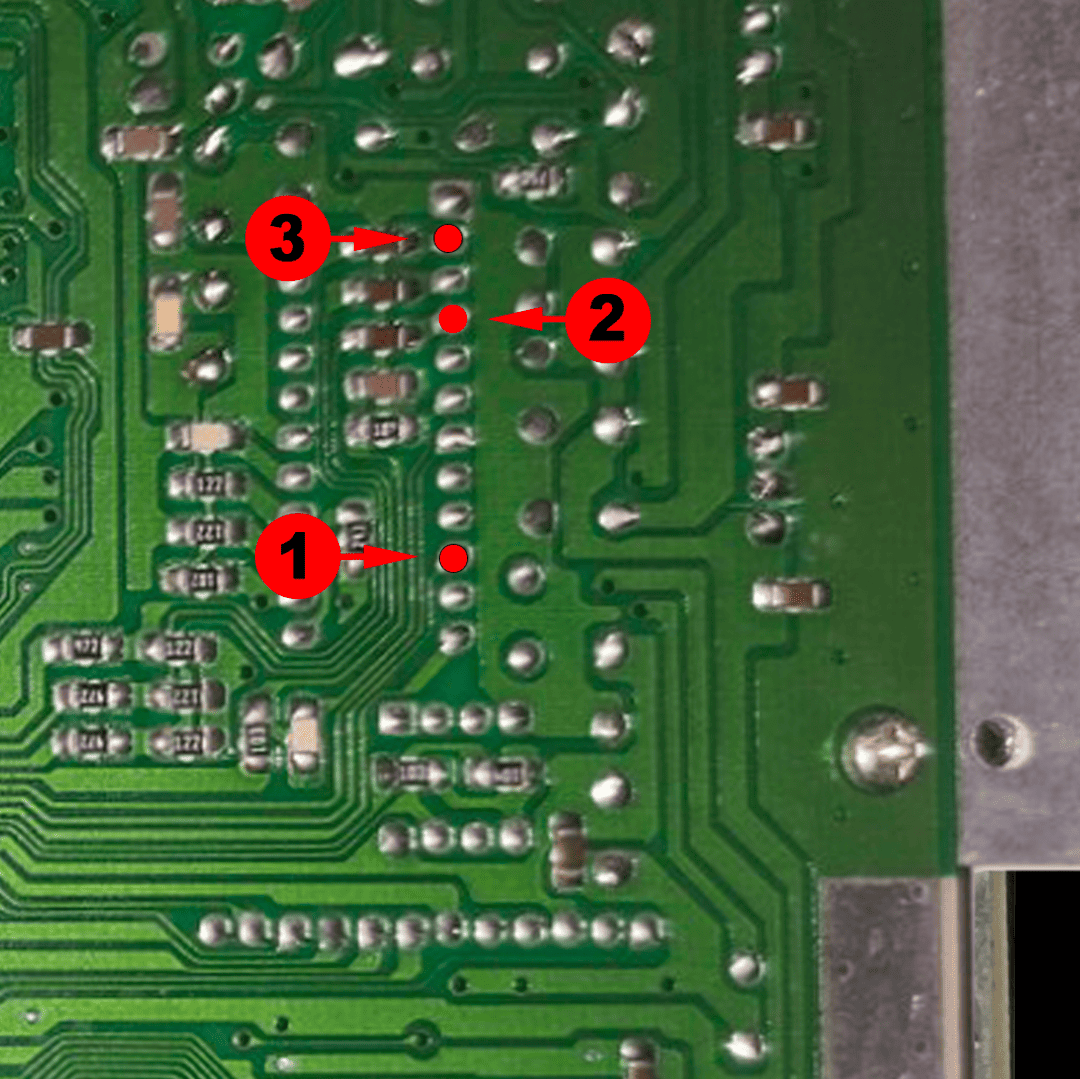
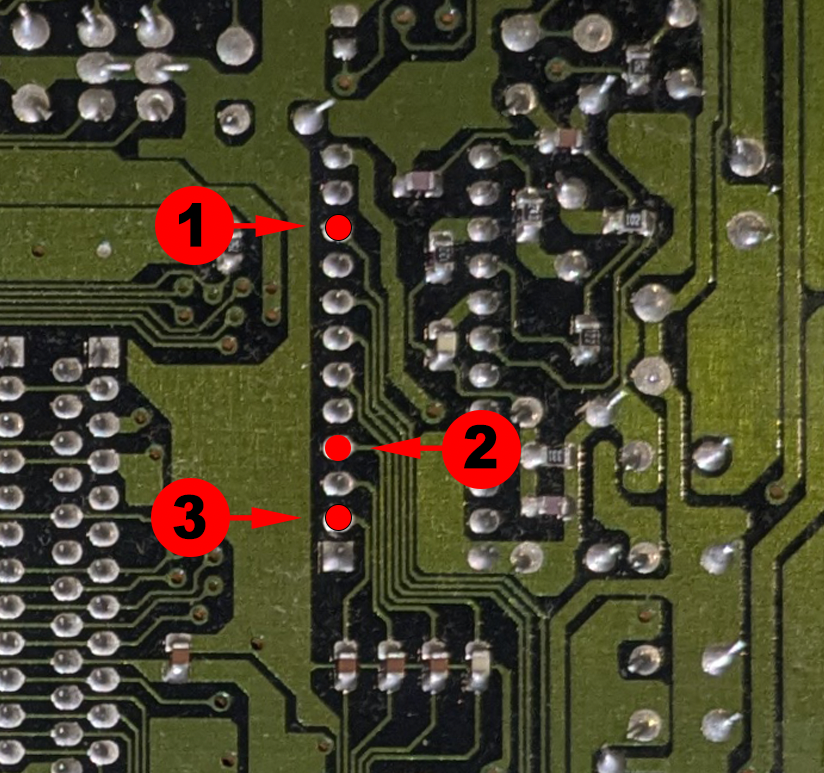
Yes. Simply remove wires 1, 2 and 3 as indicated in the installation diagrams.
The menu appears correctly via Reset, but the console also reboots. Is this normal?
Yes. The RESET trace on the motherboard was intentionally not cut in order to preserve the integrity of the console. Simultaneous rebooting is therefore expected behavior.
🎨 No color bar with a modified RGB cable
I do not get the color bar with a modified PAL FRA RGB adapter on an NTSC console. Is this normal?
Yes, this is perfectly normal. An additional modification of the cable / adapter is required to restore correct display.
Why does this problem occur?
When you use a modified PAL FRA RGB adapter on an NTSC console (JPN or USA), the video signal is not fully compatible. Even after the classic modification (trace cut + PAL sync bypass), a conflict may remain that prevents correct display of the color bar.
Solution:
To correct this behavior, it is necessary to:
  • Keep the existing modification (PAL sync bypass)
  • Add an additional trace cut on the adapter
  • Precisely follow the point indicated on the diagram below
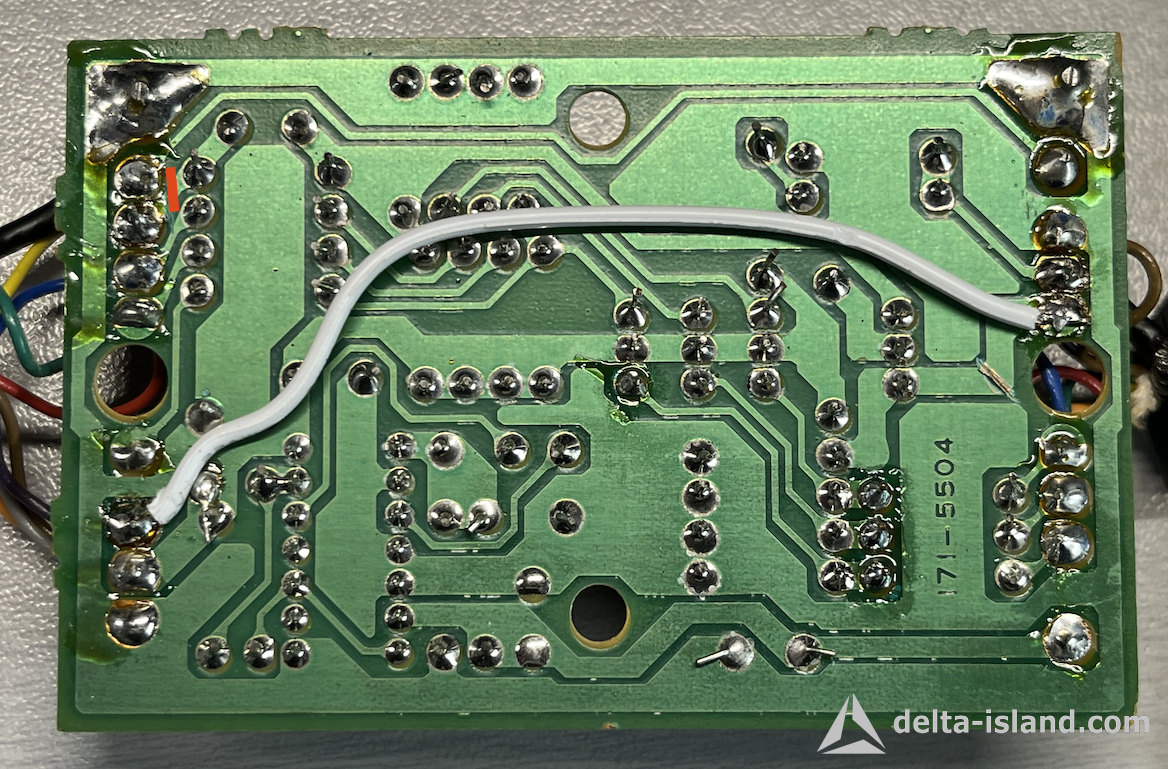
This modification restores a correct signal and brings back the on-screen color bar.
Modification adaptateur RGB Mega Drive
Red area: trace to cut to correct RGB display on an NTSC console.
 
🚀 Modernize your Mega Drive / Genesis the right way
The Delta Mega SmartDrive is the ideal solution for a clean, modern, and high-quality installation, while preserving the console’s original spirit and significantly improving ease of use.
→ View Delta Mega SmartDrive in the Delta Store


✕ ❮ ❯
Xrider Non catégorisé 21 September 2025
Retro gaming • Hardware • Modding • Dev

Delta island

Delta Island is an international platform dedicated to retro gaming, precision hardware modding, and the development of technical solutions for Sony, Sega and Nintendo consoles.

A community first and now an official store: the Forum for knowledge sharing and support, and the Delta Store to access official Delta products (QSB, PCB, modchips, kits, repair & development tools).

→ Visit the Forum → Visit the Delta Store → Tutorials & Docs
Why Delta Island?
🔧
Clean engineering
Full respect for original hardware, reliable integration, tested solutions.
🌍
Worldwide community
Modders, collectors and homebrew developers.
🛒
Official Delta Store
Secure payments, order tracking, support & documentation.
Declared & transparent activity
The Delta Store is a centralized shop: official Delta products, sold within a clear and legal framework.
 

💬 The Delta Island Forum

The forum is the heart of the project: R&D, mutual support, feedback, guides, revision identification, compatibility checks, and community support.

  • Technical discussions & ongoing projects
  • Tutorials, installation photos, troubleshooting
  • Homebrew, dev tools, NetYaroze & retro scenes
→ Join the Forum

🛒 The Official Delta Store

The Delta Store centralizes official Delta products: QSB, PCB, modchips, kits, accessories and repair solutions. Each product is designed for clean, reliable and reproducible installation.

  • Secure payments (PayPal / card)
  • Order tracking & automatic documents
  • Support + documentation included with products
→ Access the Delta Store
 

🔎 What you’ll find on Delta Island

QSB & PCB
Quick Solder Boards and optimized circuits for clean, reliable and reproducible installs.
Modding & ODE
Modern hardware solutions that respect original hardware and enhance the experience.
Dev & Homebrew
Tools, guides and projects around retro development (NetYaroze, etc.).
Tutorials
Clear documentation to identify, install, troubleshoot and preserve your consoles.
 
Note: Delta Island is an independent entity. All mentioned brands (Sony, PlayStation, Nintendo, Sega, etc.) are the property of their respective owners. Delta products are neither official nor affiliated with the original manufacturers, unless explicitly stated otherwise.
Non catégorisé
© 2017 - 2026 delta-island.com - All rights reserved

Menu English

  • Home
  • Delta Store
  • Contents
    • Net Yaroze
    • Safety Guide
  • Tutorials
    • Playstation : Delta PSNee QSB
    • PlayStation : Delta Smartwave
    • PlayStation : IGR - In Game Reset QSB
    • STU Net Yaroze
    • Megadrive : Mega SmartDrive
    • PS1 To NeoGeo Controller
    • Repair Everdrive MD V2
    • Repair Everdrive MD V3
    • GDEMU Power Supply Mod
    • Repair GamePark32 GP32 BLU FLU
    • Sega Dreamcast - DreamTray
  • Download
  • Forum